
How to find how much space a floppy disk has
Updated: 01/05/2018 by Computer Hope
Windows 95, 98, NT 4.x, 2000, Me, and XP users
- From the Windows desktop, open My Computer.
- In My Computer, highlight and right-click the 3 1/2 Floppy (A:) Drive.
- From the right-click menu, click Properties.
- The Properties window displays the used space, free space, and the total capacity of the drive, similar to what is shown below.
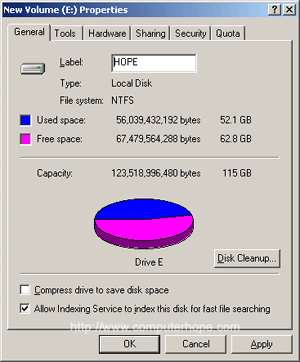
MS-DOS users and Windows 3.x and NT 3.x users
To determine the available space on a hard drive using MS-DOS, we recommend the dir command be used.
At the MS-DOS prompt, type the following command, and press Enter.
dir
At the end of the directory listing, information similar to the example below is displayed.
2 file(s)                  578 bytes
15 dir (s)          16,754.78 MB free
As you can see above, the hard drive has over 16 GB of free space. To see all files and how much space they are occupying, type the commands below.
cd\
dir /s
The commands above list all files on your computer (except the hidden files) and displays the total amount of disk space they utilize, and the free disk space.