
How to find how much hard drive space is available

The process to determine the amount of available SSD (solid-state drive) or hard drive space varies depending on what operating system you're using. To proceed, select your operating system from the list below and follow the instructions.
RAM (random-access memory) and hard drive space are two completely different things. For memory, see: How to find how much RAM is installed on a computer.
Windows Vista, 7, 8, 10,and 11 users
- Press the Windows key+E to open File Explorer.
- In the File Explorer window, in the left navigation pane, click This PC.
- After selecting This PC, in the section to the right under Folders, locate the section called Devices and drives.
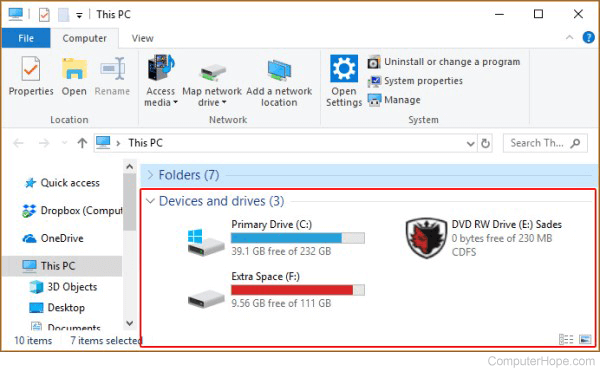
- Each storage device has a status bar, the amount of free space available, and the total disk space.
Some versions of Windows 10 don't display the status bar shown in step three. To view a drive's total and available space, hover your mouse over it for a few seconds. A small window appears containing this information.
To view additional information, right-click the drive and select Properties from the drop-down menu.
Windows 95, 98, NT 4.x, 2000, Me, and XP users
- From the Windows desktop, double-click the My Computer icon.
- In My Computer, highlight and right-click the drive whose capacity you'd like to determine.
- In the menu, select Properties.
- The Properties window displays the used space, free space, and the total capacity of the hard drive or other drives.
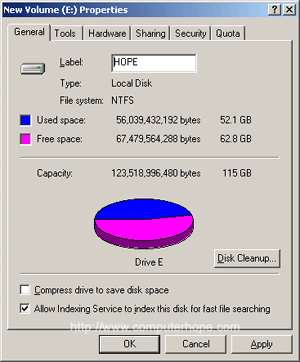
Microsoft Windows 2000 and Windows XP users
If you are running Windows 2000 or Windows XP, My Computer also displays the total size and free space for each of the drives in the main window. To view more information, and a graph of available space, follow the steps above.
You can also view the available space through MS-DOS.
MS-DOS and Windows command line users
To determine the available space on a hard drive using MS-DOS, we recommend using the dir command.
At the MS-DOS prompt, type:
dir <press Enter>
At the end of the directory listing, you see information similar to the example below.
2 file(s)                       578 bytes
15 dir (s)               16,754.78 MB free
As you can see above, the hard drive has over 16 GB of free space. To see all files and how much space they are occupying, type the following commands.
cd\
dir /s
The command above lists all files on your computer (except hidden files) and displays the total amount of disk space they utilize, and free disk space.
Windows 3.x and NT 3.x users
In Windows 3.x or Windows NT 3.x, you can determine the available free space by highlighting the C: drive, and then looking at the status bar at the bottom of the screen.
You can also view the available space through MS-DOS.
Linux and Unix users
macOS
To determine how much space is available on your iMac or MacBook depends on the version of Apple's operating system. To proceed, select the appropriate entry from the list below and follow the steps. If you're unsure which version is on your device, see our page: How to determine the version of macOS on a computer.
Checking space in Ventura and Sonoma
Here is how to view available storage space in macOS versions 13 and 14.
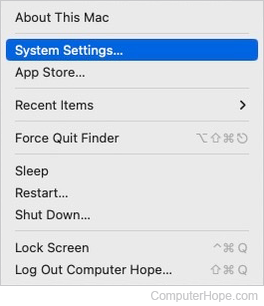
- At the top-left corner of the desktop screen, click the Apple icon.
- Select System Settings from the Apple menu.
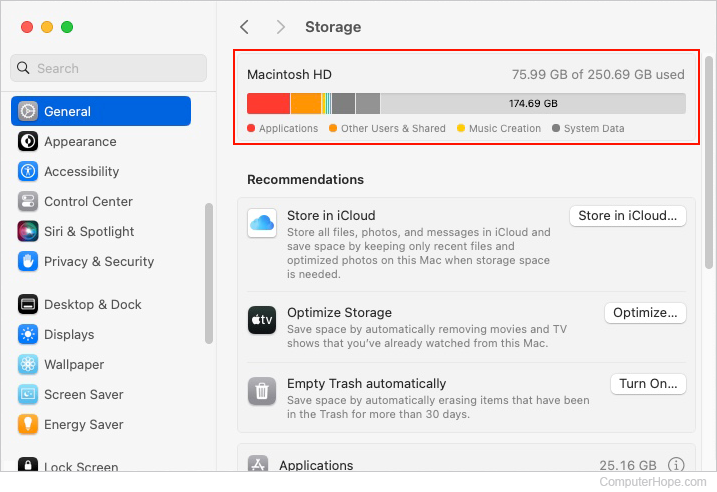
- In the sidebar, scroll down and click the General selector. Then, in the right section under General, click the Storage selector.
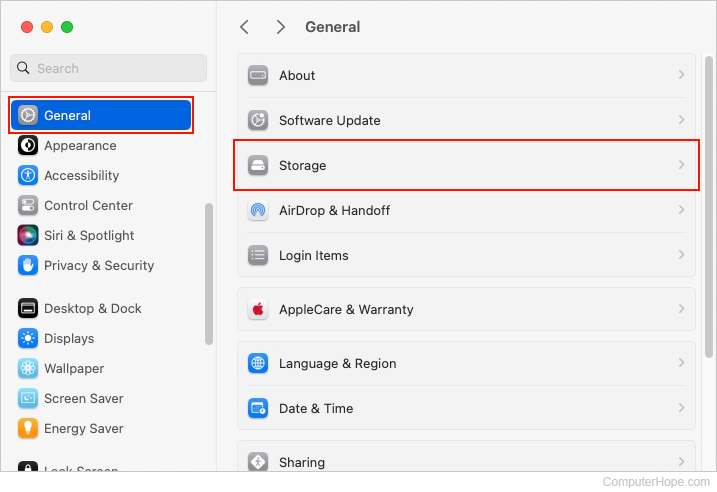
- In the section to the right, the total and remaining storage space for each drive is displayed at the top.
Checking space in High Sierra, Mojave, Catalina, Big Sur, and Monterey
Here is how to view available storage space in macOS versions 10 through 12.
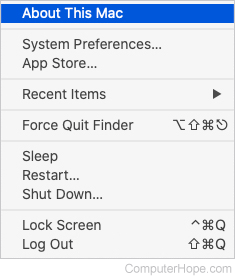
- In the menu bar at the top of the screen, click the Apple icon to open the Apple menu.
- In the Apple menu, select About This Mac.
- In the System Information window that opens, click the Storage tab at the top.
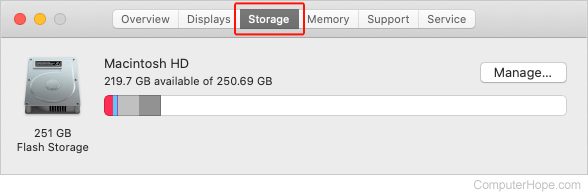
- The total and remaining storage space for each drive is displayed.