
How to reset CMOS or BIOS settings
If the computer has problems booting, errors during boot, or other abnormal problems that cannot be resolved, try resetting the CMOS settings to the default settings as explained below.
If you're seeing an error about a "media test failure," there may be a loose cable inside the computer or the hard drive might be bad.
Load or Reset defaults

To reset your computer's CMOS or BIOS (basic input/output system) settings back to the default settings, follow the steps below.
- Enter CMOS setup.
- In CMOS setup, look for an option to reset the CMOS values to the default setting or an option to load the fail-safe defaults. With many CMOS setup screens, there is a function key to do this. For example, the F5, F6, F9, F11, or F12 key, as shown in the picture, may be set up as a shortcut to load the default settings. Other setups may list an option that you can arrow over to using the arrow keys and pressing Enter.
- When found and selected, you are asked if you're sure you want to load the defaults. Press "Y" for yes or arrow to the yes option.
- Once the default values are set, make sure to Save and Exit.
Reset configuration data
If you've recently added new hardware or resetting the default values did not help resolve your boot issues, you may also want to reset the configuration data.
Not all CMOS setup screens have this feature.
Under Advanced
A Phoenix BIOS with Main - Advanced - Security at the top of the screen, you can get to this setting using the right arrow to move over to Advanced. Under Advanced, arrow down to the Reset Configuration Data option and change the value from Disabled or No to Enabled or Yes.
Once the above is done, press F10 and Save and Exit CMOS setup.
In PnP/PCI Configurations
If you're working with a Phoenix BIOS with PnP/PCI Configuration, move the cursor down to this option and press Enter. In the PnP/PCI Configurations, change the Reset Configuration Data from Disabled to Enabled.
Once the above is done, press F10 and Save and Exit the CMOS setup.
Hard reset the CMOS
When inside your computer, make sure you're aware of ESD (electrostatic discharge) and all its potential dangers.

If the steps above do not reset the CMOS settings, we suggest removing the CMOS battery, which causes the computer to forget all CMOS settings, including the password. Wait 5 minutes after removing the battery, then put the battery back into the motherboard and turn on the computer.
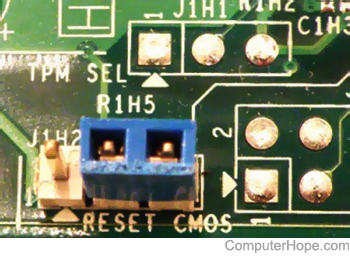
If the CMOS battery cannot be found, do a hard reset on the CMOS using a jumper or DIP switch on the motherboard. Information on finding these is in your computer or motherboard documentation.
Motherboard manufacturer support sites
Every motherboard is different. If you're still having problems, it's important to consult the documentation for your specific motherboard. See our motherboard company listing for a full list of computer motherboards.