
How to degauss a computer CRT monitor
Degaussing a computer monitor helps correct and fix any visual distortions displayed on a CRT (cathode ray tube) monitor and can also often improve the overall picture quality on the monitor.
To degauss the monitor, open the monitor set up through the buttons found on the front of the monitor. Use the buttons on your monitor to navigate all available options. (If you're having trouble using the buttons or viewing your options, consult your monitor's manual. If you don't have the manul, you can download it from the manufacturer's website.)
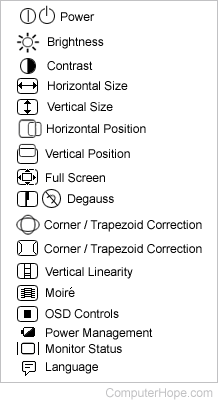
One of the options should be degauss. The picture on the right shows monitor icons including the degauss icons.
Once selected, your monitor should make a loud noise and the display appears to go distorted for a few seconds. If this occurs you've successfully degaussed your monitor.
LCD and flat-panel display users
The technology used to create the picture in an LCD (liquid-crystal display), flat-panel display, laptop, and any other non CRT monitor is not the same. Therefore there is no degaussing option available for these displays.