
My program, game, or other software is closing to desktop
This page is for users who encounter a crash without any error. If you're getting an error, try searching for the error message you're encountering.

This problem can be caused by many different issues, and with no specific error, it can be difficult to troubleshoot. However, following the below suggestions should help identify or give you a better idea of what's causing the issue.
Reboot the computer
Sometimes the best solution is to reboot the computer. If something was recently installed or there are other glitches with the software or other running programs, rebooting the computer fixes these issues. If the problem persists after rebooting the computer, continue with the steps below.
Close background programs
Close all other programs running in the background, such as instant messengers, media players, browser windows, etc. If the program or game no longer crashes, it's likely one of these programs running in the background is causing your issue.
Programming errors
A long list of programming errors can cause a program to abnormally quit. Make sure the program that is encountering the errors is fully updated with all the latest patches. Also, for a program or game that's been recently released, it can take time for all bugs to be corrected. You may need to wait a few months after the date of release if patches and the suggestions below do not resolve your issue.
If the program worked before a patch, it's likely that patch introduced new errors and another patch needs to be installed.
Hardware driver related issues
Especially in the case of computer games, driver problems cause issues with programs you run on the computer. Make sure you have the latest drivers on your computer, especially in the case of your video card, which are often updated every month or two.
Links to driver sites and help with drivers found in our drivers help and information.
Verify system requirements
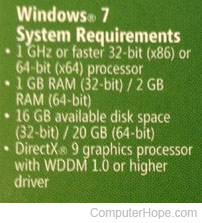
Make sure the computer that is running the program is exceeding the system requirements. If the program requires 512 MB of memory and your system only has 512 MB, it may be time to add some additional memory to the computer.
For additional information about adding memory to your computer, see: How to install computer memory (RAM).
Check for heat-related issues
If your CPU (central processing unit), GPU (graphics processing unit), or hard drive is getting too hot, it can cause any number of issues. Make sure your computer is not getting too hot by installing a third-party utility to monitor your system heat.
Contact developer of game or program
Contact the game or program developer to see if they're familiar with any known issues or incompatibilities you may be encountering, and ask if any known resolutions are available.
A listing of contact information for hundreds of different developers is on our third-party software help and information.
Bad installation
In some situations, if the installation encounters errors during the installation, it can cause the program to not run properly. If you've followed the steps above, reinstall the program. Realize that if any patches were installed, they need to be reinstalled.
Faulty hardware
If all the suggestions above were attempted and the program developer claims there are no known issues, you may have bad hardware in the computer.