
How to enable or disable NVIDIA SLI mode
Updated: 01/05/2018 by Computer Hope
Below are the steps to enable SLI (Scalable Link Interface) mode if your computer has two or more video cards in the computer.
- Right-click anywhere on your desktop and select NVIDIA Control Panel from the drop-down menu or click the NVIDIA icon in the Systray.
- Once you've opened the NVIDIA Control Panel, click the Set SLI configuration link under the 3D settings menu.
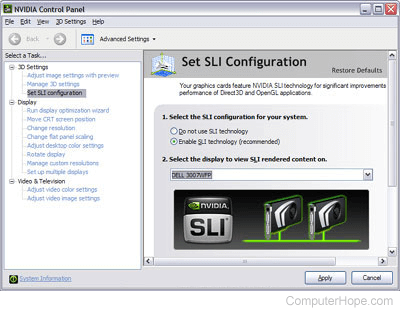
- Finally, select either Do not use SLI technology or Enable SLI technology (recommended) to toggle SLI on or off.
I don't see the "Set SLI configuration" option
If you get to step two in the previous section, but don't see a configure SLI option, it's likely that there is an issue with video card configuration. The following suggestions are to help clear up these issues.
- Make sure your video cards are properly seated and that the SLI bridge is installed correctly.
- Sometimes, swapping the slots your cards sit in does the trick.
- Verify that Windows Device Manager is showing two identical graphics cards in the Display Adapters section.
- Ensure that SLI is enabled in your BIOS (basic input/output system) settings.
- If you have an older motherboard, you may need to configure your jumpers to enable SLI. Consult you motherboard manufacturer's manual for instructions.
- Make sure you have an adequate power supply.
- Get the latest drivers for you BIOS and video card.
- One of your graphics cards may not be functional. Try installing them one at a time to make sure they both work.