
Device Manager
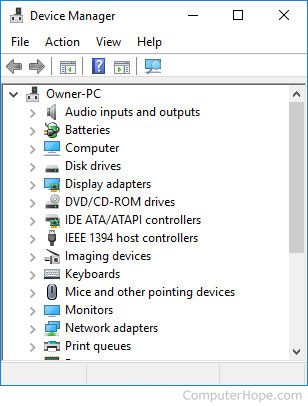
First introduced in Windows 95, the Device Manager is a feature of Microsoft Windows that detects and lists hardware devices and their status information. The device driver settings and information is also stored here. Device Manager is available in Microsoft Windows 95, 98, Me, 2000, 2003, XP, Vista, 7, 8, 10, and 11.
Computers running macOS do not have the Device Manager utility, but instead have the System Information utility, which is similar to Device Manager. Chromebooks do not have a Device Manager or similar utility available.
Opening the Device Manager
To open the Device Manager in Windows 10:
- Press Windows key+X (hold down the Windows key and press X) to open the Power User Tasks Menu.
- Select Device Manager (or press M).
or
- Click Start or press the Windows key.
- Type devmgmt.msc and press Enter.
or
The Program and Features window can be open by running the associated .cpl file. To do this, follow the steps below.
For information about opening the Device Manager in previous versions of Windows, see: How to open Windows Device Manager.
Device Manager categories
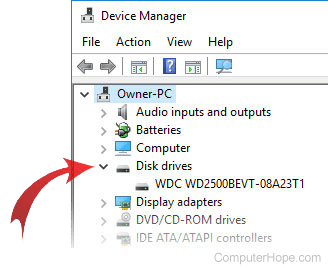
The Device Manager window divides all the devices on your computer into categories. To find a specific device, click the arrow next to its icon and category, as shown in the image at the right. Doing so expands that category, listing all its devices. You can then double-click a specific device to view its properties, status, and driver information.
Below is a listing of the device categories with a description of each.
Audio inputs and outputs
Lists all input and output audio devices. Examples include microphone jacks, internal computer speakers, and USB audio devices.
Batteries
Displays any batteries detected by Windows. This category only displays ACPI (advanced configuration and power interface) compliant batteries that power computers. Other batteries, such as a CMOS (complementary metal-oxide semiconductor) battery, may be under System devices.
Bluetooth
View detected Bluetooth devices and chipsets on the computer.
Computer
This category lists your entire computer as a single device. It should not be necessary for you to make any changes directly to your computer in this listing, and you can safely leave this category alone.
CD-ROM
Displays detected CD-ROM drives in the computer. Later versions of Microsoft Windows renamed this category to DVD/CD-ROM drives to help accommodate all the new CD (compact disc) and DVD (digital versatile disc) drives.
Disk drives
Displays each of the hard disk drives installed in the computer.
Display adapters
Displays each of the video cards detected in your system.
DVD/CD-ROM drives
Included in Microsoft Windows 2000 and later, this category is the replacement for the earlier CD-ROM (compact disc read-only memory) category and displays all CD and DVD drives currently detected or installed by Windows.
Firmware
List device and system detected firmware.
Floppy disk controllers
Displays each of the floppy disk drive controllers detected on the motherboard.
Floppy disk drives
Displays each of the floppy disk drives currently installed in the computer.
Human Interface Devices
Displays any HID (human interface device) devices currently detected by Windows. For example, game controllers and USB devices may be listed in this category.
IDE ATA/ATAPI controllers
Included in Microsoft Windows 2000 and later, this category displays each of the ATA (Advanced Technology Attachment) or ATAPI (AT Attachment Packet Interface) controllers currently detected on the motherboard. Earlier versions of Windows listed this category as Hard disk controllers.
IEEE 1394 bus host controller
Displays any IEEE 1394 controllers on your system.
Imaging devices
Lists any devices on your system that capture video or images. A laptop's built-in camera and scanners are listed here.
Keyboards
Displays each of the keyboards detected by Windows.
Mice and other pointing devices
Included in Microsoft Windows 2000 and later, this category displays each of the computer mice, touchpad, and any other pointing devices detected by Windows. In earlier versions of Windows, this category was called Mouse.
Modem
Displays each of the computer modems detected by Windows.
Monitors
Displays each of the computer monitors detected by Windows.
Multi-function adapters
This category contains devices that occupy a single location on the system bus, but perform more than one function. A common example of a multi-function device is a combination printer/scanner/fax machine.
Network adapters
Displays each of the computer network interface cards detected by Windows.
Other
Displays any hardware device that is either not installed correctly or cannot be detected by Windows. If devices are listed in this category, they are experiencing connectivity or compatibility issues with the computer.
PCMCIA socket
Displays a listing of PCMCIA sockets detected by Windows.
Portable Devices
List of external drives connected to the computer.
Ports (COM & LPT)
Displays any COM ports (serial ports) and LPT ports (parallel ports) detected by Windows. This section also displays what COM ports are detected. For example, if you have multiple serial ports, you may see a COM1 and COM2 and an LPT port may show as an ECP (extended capabilities port) printer port. The COM and LPT ports are configured through the computer's BIOS (basic input/output system).
Print queues
Lists any print queues used by the system to print documents. This list may include virtual print devices such as Microsoft Print to PDF and Microsoft XPS Document Writer.
Printers
A listing of all installed physical printers.
Processors
Included with Windows 2000 and later, this category displays any processors detected by Windows. If your computer has multiple processors or processor which support Hyper-Threading, multiple processors may be listed.
SCSI controller
Displays any SCSI (small computer system interface) controllers currently detected by Windows.
SD host adapters
Lists any SD (Secure Digital) host adapters in your system that read and write to media such as an SD Card.
Security devices
List detected TPM (Trusted Platform Module).
Sensors
Lists any sensor devices on your system, such as real or virtual GPS (Global Positioning System) devices.
Software components
List of the software components detected by the computer.
Sound, video, and game controllers
Display the computer sound card, video capture devices, codecs, and game controllers currently installed. Note your video card is listed under Display adapters, and not this category.
Storage controllers
List each of the disk controllers for storage devices.
System devices
The remainder of the system hardware devices that are not already listed in this section. For example, this section lists motherboard resources, such as the controllers, PCI (peripheral component interconnect) bus, system speaker, and system timer.
UCMCLIENT
Display UCM client devices.
Universal Serial Bus controllers
Displays each of the USB (universal serial bus) devices, controllers, and hubs that are plugged in and currently detected by Windows.