
Add or Remove Programs
The Add or Remove Programs is a feature in Microsoft Windows that lets a user uninstall and manage the software installed on their computer. This feature was introduced in Windows 98 as Add/Remove Programs, later renamed Programs and Features.
How to open Add or Remove Programs in Windows 10 and 11
- Press the Windows key, type programs
- Make sure Add or remove programs is highlighted and press Enter.
- A window similar to the picture below should appear.
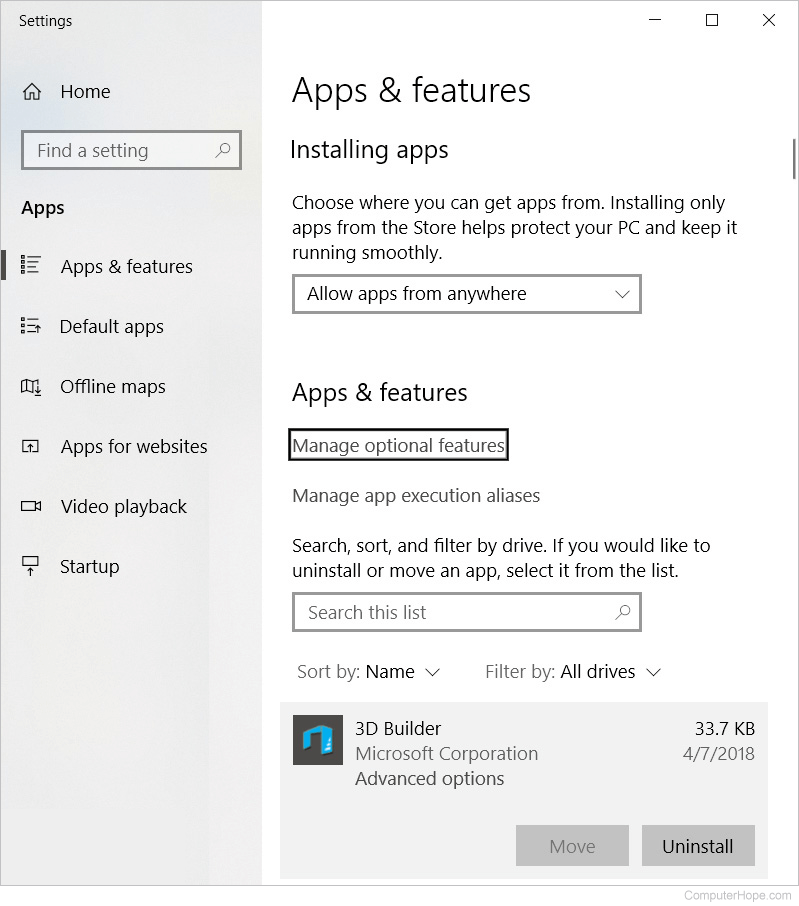
- From this window, you'll be able to manage how Windows installs programs and also uninstall any programs that were installed.
or
The Program and Features window can be opened by running the associated .cpl file. To do this, follow the steps below.
- Click Start
- Type appwiz.cpl and press Enter.
or
- Open the Control Panel
- Click Programs and Features, or under the Programs section, click Uninstall a program.
- From this window, you'll be able to manage how Windows installs programs and also uninstall any programs that were installed.
See the link below for additional help with uninstalling software in Windows.
Open Add or Remove Programs in Windows 7 and 8
- Open the Control Panel
- Under the Programs section, click Uninstall a program.
- A window like the one shown below should appear with a list of all the programs on your computer.
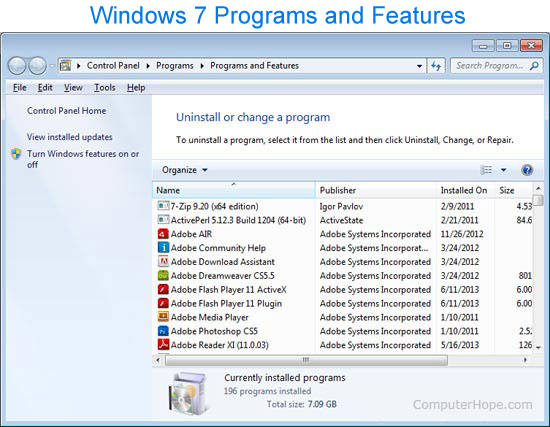
- From the Programs and Features section of Windows, you can uninstall a program, adjust Windows features, and view installed updates.
or
The Program and Features window can be opened by running the associated .cpl file. To do this, follow the steps below.
- Click Start
- Type appwiz.cpl and press Enter.
or
- Press the Windows key, type Programs and Features or Add and remove programs, then press Enter.
- A window similar to that shown above should appear.
- From the Programs and Features section of Windows, you can uninstall a program, adjust Windows features, and view installed updates.
See the link below for additional help with uninstalling software in Windows.
How to open Add or Remove Programs in Windows Vista
- Open the Control Panel
- Under the Programs section, click Uninstall a program. If the Control Panel is showing icons, click Programs and Features.
- From the Programs and Features window, you can uninstall a program, adjust Windows features, and view installed updates.
or
The Program and Features window can be open by running the associated .cpl file. To do this, follow the steps below.
- Click Start
- Type appwiz.cpl and press Enter.
or
- Press the Windows key, type Programs and Features, then press Enter.
- A window similar to that shown above should appear.
- From the Programs and Features section of Windows, you can uninstall a program, adjust Windows features, and view installed updates.
See the link below for additional help with uninstalling software in Windows.
How to open Add or Remove Programs in Windows XP
- Open the Control Panel
- Double-click Add or Remove Programs.
- A window like the one below should appear with a list of all the programs on your computer.
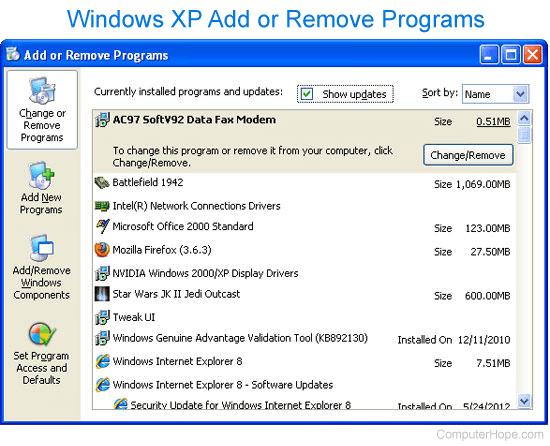
- To remove a program, select it on the list and click the Change/Remove button.
or
The Add or Remove Programs window can be open by running the associated .cpl file. To do this, follow the steps below.
- Click Start
- Type appwiz.cpl and press Enter.
See the link below for additional help with uninstalling software in Windows.
How to open Add/Remove Programs in Windows Me and 98
- Open the Control Panel
- Double-click Add/Remove Programs.
- A window should open that lets you uninstall software in Windows.
Should I write "Add/Remove Programs" or "Add or Remove Programs?"
Unless you're discussing early versions of Microsoft Windows (e.g., Windows 98 or Windows Me), this section is called "Add or Remove Programs."
With Windows Vista and Windows 7, if you're writing about uninstalling and managing software in Windows, refer to this section as "Programs and Features." With Windows 8 and Windows 10, it should be called "Apps & features."