
Close
Close may refer to any of the following:
1. In general, close is the action performed to terminate a program or exit a file. If a file has changed since it was opened and is closed without saving, those changes are lost. If the program closes without performing the close action, this is usually called a crash.
To close a program or an Internet browser with all open tabs, press the keyboard shortcut Alt+F4 in Microsoft Windows or Command+Option+W on an Apple Mac computer. When multiple open windows, files, or tabs are open, press Ctrl+F4 or Ctrl+W in Windows (Command+W on a Mac) to close them one at a time without closing the program.
In Microsoft Windows, programs that support Ctrl+W can also use the shortcut Ctrl+Shift+W to close all open tabs.
Pressing the Esc key often closes or resizes any window, dialog box, or other elements that don't have a close button.
How to close an open program
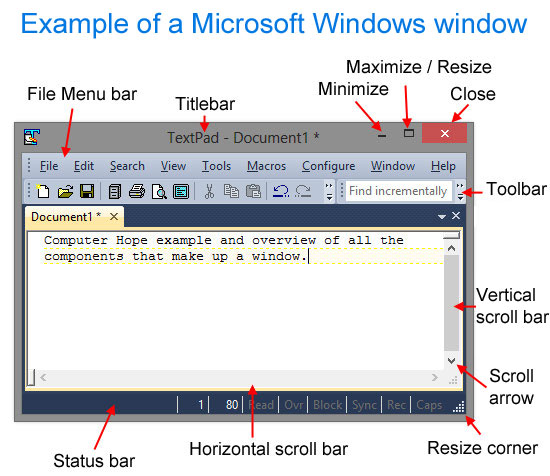
To close or exit a program window or application, click the close button (see example below) or use one of the keyboard shortcuts from the tips above.
How to close Windows or another operating system
If you're done using your computer, you can shut it down to close all programs and turn it off. For more information, see: How to shut down a computer.
How to close a program that is not responding
If a program is frozen or not responding, see: What should I do when a computer freezes or locks up?
How to close a tab
A program, such as an Internet browser with multiple tabs, can have the individual tab closed by clicking the "X" next to the tab's name. If the tab does not have an "X," try hovering over the tab or clicking the tab to see if one appears.
Pressing Ctrl+W also closes the tab currently open.

2. With a button or GUI (graphical user interface) operating system feature, the close box or close button exits a window in a program or the entire program. For example, in most operating systems and programs, the close button (denoted by an "X") is located in the top-right corner of the window.
Example of a close button
If a program has multiple documents, files, tabs, or windows open, clicking the "X" at the top-right corner (top-left on macOS) closes everything. Clicking any "X" below the top-right corner "X" closes that specific document, file, tab, or window in the program, but not the entire program. The close program button is a red box shown in the example below, with another X for the Document1 tab. Clicking the X for the Document1 tab closes only the Document1 document window, but leaves the TextPad program open.
Close button for Apple computer users
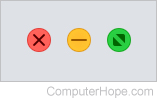
On Apple macOS, the close button is a red "X" button in the window's top-left corner, as shown in the image.
What if the close button is missing?
The close button may be missing for various reasons. Common reasons include a program running in fullscreen mode or a program that hides the close button for a cleaner aesthetic appearance (e.g., Windows 8 programs). Try moving the mouse to the top of the screen to see if the hidden close button reappears. If this does not work, try pressing the Esc key. If none of these suggestions work, and you are running Windows, you can use the keyboard shortcut Alt+F4 to close any Windows program.
3. Close is a command used to exit a program. For example, in an FTP (file transfer protocol) session, typing "close" and pressing the Enter key exits the current session.

4. Close is a type of physical action. For example, when a CD-ROM (compact disc read-only memory) tray is ejected, if you push in on the tray, you are attempting to close it.
5. When creating or writing to a CD-R (compact disc recordable) disc, your program or operating system may ask you to "Close the disc." In this context, close refers to the disc being finalized so that no additional information may be written to the disc. With some early CD drives and players, if the disc is not closed, it cannot be read by another computer or disc player.
6. With an issue, question, post, or ticket, closed refers to something no longer being reviewed or answered. For example, if you open a support ticket, the ticket remains "open" until you and the support department agree that the issue is resolved. When that occurs, the ticket is "closed," meaning no further action is taken, and no further information about that issue is recorded.
7. With computer software, closed or closed-source refers to software designed and controlled by one company. Anyone outside the company cannot view the source code. In contrast, open source is code that anyone can view and edit.
Bye, Closed file, Exit, Maximize, Minimize, Open, Operating system terms, Proprietary, Quit, Window, X