
Directory
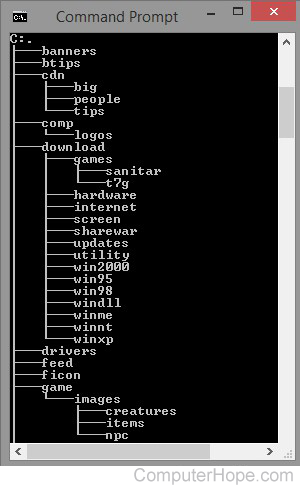
A directory is a location for storing files on your computer. Directories are found in a hierarchical file system, such as Linux, MS-DOS, OS/2, and Unix.
Pictured is an example of output from the Windows/DOS tree command. It shows all the local and subdirectories (e.g., the "big" directory in the "cdn" directory). Looking at this overview, the current directory is the root directory of the C: drive. It's called the "root" directory because there is nothing beneath it, and the other directories "branch" from it. If you uses an operating system with multiple user accounts, the directory may also be called a home directory.
In a GUI (graphical user interface) such as Microsoft Windows, directories are called folders. However, a directory and folder are synonymous.
Overview of a directory and path
Below is an example of what a directory path would look like in MS-DOS.
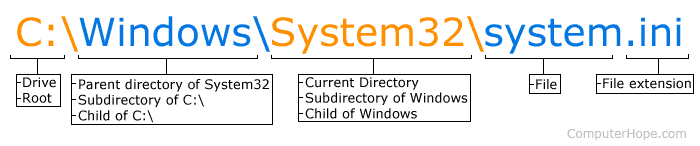
In the picture, C: is the drive letter, and the current directory is System32, a subdirectory of the Windows directory.
Overview of a Linux directory path
Below is an example of what a directory path may look like in a Linux or Unix variant.
/usr/bin
In the above example, the current directory is bin, a subdirectory of the usr directory. The beginning forward slash is the root directory.
How do I list or view directories?
To see directories and files in the current MS-DOS directory, use the "dir" command. In Linux, to view directories and files in the current directory, you'd use the "ls" command.
- See the dir command page for further information and examples on this command.
- See the ls command page for information and examples on this command.
Both of the above commands also have switches that can be added to only view directories and not directories and files.
How to change a directory
To change a directory in MS-DOS, Linux, Unix, and most other command line operating systems, use the "cd" command.
- How to change a directory or open a folder.
- How to change or rename a file, folder, or directory.
- MS-DOS and Windows command line cd command information.
- Linux and Unix cd command information.
How to make a directory
To make a directory in MS-DOS, Linux, Unix, and most other command line operating systems, use the "mkdir" command.
- MS-DOS and Windows command line mkdir and md command information.
- Linux and Unix mkdir command information.
- How to create a directory or folder.
How to delete a directory
To remove a directory in MS-DOS, use the "rmdir" command. In Linux and Unix, use the "rm -r" command.
- How to delete a file, directory, or folder.
- MS-DOS and Windows command line rmdir information.
- How to remove a full directory in Linux.
What is the purpose of a directory?
A directory stores, organizes, and separates files and other directories on a computer. For example, you could have a directory to store pictures and another to store all your documents. By storing specific types of files in a folder, you could quickly get to the type of file you wanted to view. In other words, if only pictures were in a pictures directory, it's easier to find a picture than a directory containing all types of files.
Directories are also used as a place to store programs. For example, when you install a program, its files are stored in a unique directory that may contain subdirectories and tens, hundreds, or thousands of files related to that program. By storing a program in its own directory, it helps prevent files with the same name from getting overwritten, modified, or deleted by other programs.
What type of files can be stored in a directory?
A directory can contain one or more files of any type and can even store other directories that contain files.
Invalid directory characters
Below is a listing of reserved characters that cannot be used when creating a file or directory on most operating systems. When creating directories, if any of these characters are used, you'll receive an error or encounter other problems.
\, /, :, *, ?, ", <, >, and |
How are files different than a directory?
A directory is an area on the computer containing other directories and files and helps keep the computer organized. Files can be within a directory and contain information used by the operating system or other programs on the computer. See our file page for further information on files.
Does a directory have an extension?
No. A directory does not have an extension like a file.
Absolute path, Change directory, Current directory, File, Folder, Hierarchical file system, Home directory, Mkdir, MRUD, Network directory, Operating system terms, Parent, Path, PWD, Root directory, Shared directory, Subdirectory, Wd