
Phishing
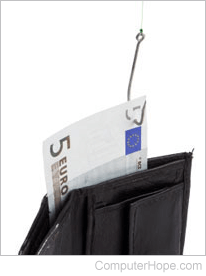
Pronounced as fishing, phishing or brand spoofing is a malicious technique of tricking users into giving away personal information to an attacker. They do so by sending e-mails or creating web pages designed to collect an individual's personal information such as bank, credit card, or other login information. Because these e-mails and web pages look legitimate, users often trust them and enter personal information. Review the sections below for more details, examples of phishing attempts, and ways to avoid phishing attacks and threats.
Why is it called phishing?
Phishing is a wordplay of "fishing," where someone uses a fishing pole to cast a line into the water hoping to catch a fish. With phishing, an attacker sends thousands of e-mails (like casting a fishing line) hoping to get someone to give them their information.
Example of a phishing e-mail
Dear eBay customer,

Your Account is Suspended. We will ask for your password only once. We will charge your account once per year. However, you will receive a confirmation request in about 24 hours after the make complete unsuspend process. You have 24 hours from the time you'll receive the e-mail to complete this eBay request.

Note: Ignoring this message can cause eBay TKO delete your account forever.

To make unsuspend process please use this link:

http://fakeaddress.com/ebay

eBay will request personal data(password;and so on) in this e-mail.

Thank you for using eBay!

http://www.ebay.com

---------------------------------------------------------------------

This eBay notice was sent to you based on your eBay account preferences. If you would like to review your notification preferences for other communications, click here. If you would like to receive this e-mail in text only, click here.
To those who frequently use online services, these e-mails may appear to have come from the company. However, they are designed to make a user want to click a link that helps them steal personal information such as usernames, passwords, credit card, and personal information. Below are some helpful tips for identifying these e-mails and how to handle them.
How to identify a phishing e-mail
Identifying a phishing e-mail is key to avoiding a phishing attack. Here are some things to look out for when reading e-mail.
- Wrong company - These e-mails are sent to thousands of e-mail addresses, and the attacker has no idea who you are. If you have no affiliation with the company, it's likely fake. An example is an e-mail that claims to be from Wells Fargo bank, but you bank at a different bank.
- Spelling and grammar - Improper spelling and grammar are often a dead giveaway. Look for obvious errors.
- No mention of account information - If the company were sending you information regarding errors to your account, they would mention your account or username in the e-mail. In the example above, the e-mail addresses the recipient as "eBay customer." If this were eBay, they would use your username or first name. However, be cautious of spear phishing, where the attacker knows some personal information.
- Deadlines - E-mail requests an immediate response or a specific deadline. For example, the example above requires logging in and changing your account information in 24 hours or less.
- Links - Although many phishing e-mails are better at hiding the true URL (Uniform Resource Locator), they are still not part of the company's URL. For example, in our eBay example, "http://fakeaddress.com/ebay" is not an eBay URL, but only a URL with an "ebay" directory. See the next section for information about identifying a phishing website.
How to identify a phishing website
Anyone with enough knowledge can design or copy another website to make it appear as though you're visiting a legitimate site. Consequently, it's important that you don't judge a website by its appearance and always look at the URL of the page, which cannot be faked. This practice is especially critical any time you enter personal information on a website (e.g., username, password, credit card, etc.). The sections below describe items to look for when examining the URL.
Understanding the URL
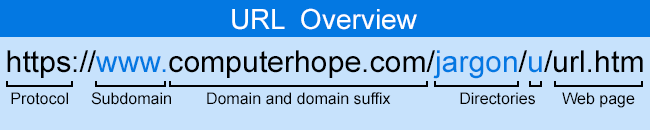
Also called the page address, a URL allows a browser to find a website on the Internet. Below is a quick overview of a URL's structure. For further information, see our URL page.
Is the site secure?
A secure site always starts with "https" at the beginning of the address. These five letters indicate that any information sent to and over the site is encrypted. Although a bad actor can create a secure site, it is more challenging than creating a non-secure site.
Any site that requires personal information should be secure.
Is the domain name the company's name?
Does the domain name reflect the company you're dealing with and is it spelled correctly? A common typosquatting technique is to create a domain name similar to the correct one, but not the same. For example, "computerhope.com" is our correct domain name, while "computerhoe.com" is not.
Some fake sites may also obfuscate a domain name by replacing letters with numbers. For example, replacing an "o" in computerhope.com with a zero makes it appear to be the Computer Hope website address when it is not.
Make sure the subdomain is not the company's name
Verify the company's name is not the subdomain. For example, "https://computerhope.fake.com" is not a Computer Hope domain; "fake.com" is the domain name. The domain name is always followed by the TLD (Top-Level Domain), in our case, ".com."
Make sure the company's name is not a page or directory
A common tactic an attacker uses is making a directory or page the same name as a company. For example, "https://www.computerhope.com/comp/ebay.htm" is a web page on Computer Hope about the company eBay. Even though "ebay" is part of the URL, it's not an eBay page. Similarly, "https://www.computerhope.com/ebay" is a directory on the Computer Hope server, not a page run by eBay.
What to do if you are unsure if an e-mail is official
- Never follow any link in an e-mail. Instead, visit the page by manually typing the web address in the Internet browser. For example, in the example above, instead of visiting the fake eBay URL, type https://www.ebay.com in your web browser and log in to the official website.
- Never send any personal information through e-mail. If a company requests personal information or says your account is invalid, visit the website and log in to the account directly.
- If you are still concerned about your account or personal information, contact the company directly through their e-mail address or phone.
Issues commonly contained in phishing e-mails
Below are some issues a phishing e-mail may inquire about to trick users.
- Account issues - account or password expiring, account being hacked, account out-of-date, or account information needs to be changed.
- Credit card or other personal information - a credit card expiring or being stolen, an incorrect social security number or other personal information, or duplicate credit card or other personal information.
- Shipping problems - shipping company claiming a package cannot be delivered.
- Confirming orders - a request to log in to confirm recent orders or transactions.
- Someone buying or selling online - someone claiming to be interested in buying or selling something online.
Common companies affected by phishing attacks
Below is a listing of companies that phishers often try to attack.
- Any major bank.
- Popular websites, including Amazon, Facebook, Gmail, MySpace, PayPal, eBay, Microsoft, Apple, and YouTube.
- Government: FBI, CIA, IRS, etc.
- Shipping companies like DHL, FedEx, UPS (United Parcel Service), or USPS (United States Postal Service).
- Internet service providers, including AOL (America Online), AT&T, Cox, Google, MSN (Microsoft Network), Xfinity, and others.
- Casinos and lottery.
- Online dating or community websites.
I've fallen for a phishing attack; what should I do?
If you are a victim of a phishing attack, log in to your account from the company's page and change your password immediately. Scan your computer for malware in case the site has infected your computer. Additionally, if the company supports two-factor authentication, we strongly recommend enabling this feature on your account.
If you believe personal information was stolen, watch all your other accounts for suspicious activity.
Suspected phishing e-mails can also be forwarded to [email protected], an e-mail address from APWG (Anti-Phishing Working Group). APWG is a non-profit founded in 2003 and is an international coalition of counter-cybercrime responders, forensic investigators, and law enforcement agencies.
For additional help and recommendations, especially if you are concerned about possible identity theft, visit our page below.
What is a phishing kit?
A phishing kit is a collection of software tools and sometimes e-mail addresses that help a novice user target someone. These kits are developed by more experienced computer users and sold on the dark web.
419, Blagging, Catfish, Chain mail, Clickjacking, Computer crime, Computer slang, Con, Cross-site scripting, Cyberattack, Cybersecurity, E-mail, E-mail terms, Harvesting, Hoax, Identity theft, Internet terms, Malware, Man-in-the-middle attack, Pharming, Security terms, Smishing, Social engineering, Spam, Spear phishing, Spoof, Theft, Threat, Vishing, Whaling