
WordPad

Microsoft WordPad is a free rich text editor and word processor, first included with Microsoft Windows 95 and all versions since. Although capable of doing more than Notepad, WordPad is not as advanced as Microsoft Word. However, it does give you additional features, such as the capability of inserting pictures and text formatting. The picture below shows an example of Microsoft WordPad.
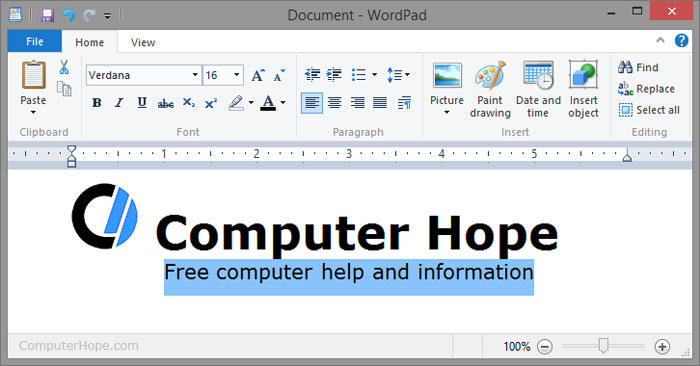
Microsoft WordPad can edit and save plain-text file (.txt), rich text format (.rtf), Microsoft Word (.doc or .docx), and OpenDocument text (.odt) format files.
Not all versions of WordPad support all above formats. Windows 95, Windows 98, Windows Me, and Windows XP does not support the .docx format. Windows 7 introduced the support of .odt files, so early versions of Windows do not support this format as well.
How to open Microsoft WordPad
Users who are using a version of Microsoft Windows that supports WordPad can run Microsoft WordPad (wordpad.exe) by following the steps below.
Windows 10
- Press the Windows key to open the Start menu.
- Type wordpad and press Enter.
Windows 8
- Press the Windows key to open the Start screen.
- On the Start screen, type wordpad.
- In the search results, click the WordPad program.
Windows 7 and earlier
- Press the Windows key to open the Start menu.
- Click the Run option.
- Type wordpad or write, then press Enter.
OR
- Click the Start menu.
- Click Programs and then Accessories.
- Click the Wordpad icon.
Why use Word instead of a WordPad?
A rich-text editor like WordPad offers many of the same basic features as Microsoft Word. Where Microsoft Word differs is the ability to do more advanced features. Some advanced features include mail merges, spellchecker, styles, tables, headers & footers, WordArt, columns, margins, and more.
How to change from WordPad to Word
If you have Word installed on your computer, you can switch to Word by opening the Word program instead of WordPad. Any documents you've created in WordPad can also be opened in Word by browsing to their location.
CamelCase, Document, Editor, Notepad, RTF, Software terms, Text, TextEdit, Windows Accessories, Word, Word processor, Word processor terms