
Computer hard drive buying tips
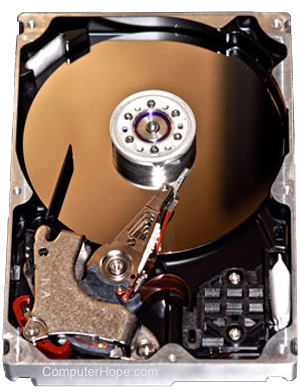
When purchasing a hard drive, it is important to understand and verify the hard drive is suitable for your uses and has or does not have the options you may or may not need. Unfortunately, with hard drive technologies frequently changing, it is can sometimes be confusing and frustrating when looking to purchase a hard drive.
This page covers all considerations you should think about when thinking about upgrading or buying a new computer hard drive.
Adding a new drive
If you are adding a new hard drive because you need more disk space, and you have a desktop computer, a new hard drive can be added without replacing the old drive.
The benefit of adding a new hard drive is that you gain additional storage without having to erase any of your existing files or reinstall any of your programs.
Replacing existing drive
If you have a laptop computer or want to replace an older hard drive (HDD) with a new solid-state drive (SSD), keep in mind that anything on the drive will be lost. While it is possible to transfer all of the data from one drive to another drive, we recommend doing a fresh install to prevent any future problems and to clean all of the junk software.
Before replacing a hard drive make sure you:
- How to back up your computer.
- Make sure you have the operating system disc or recovery disc.
- Make sure you have all the necessary discs to reinstall your software.
Interface
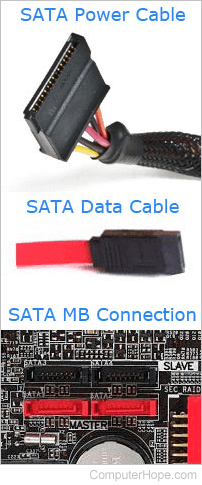
When looking to purchase a hard drive, the first and foremost important consideration is the interface the hard drive uses to connect and communicate with the computer. Below is a listing of each of the available interfaces with information how they may or may not apply to your computer.
- SATA - The more commonly found hard drive and used with all new computers. Most computers today can accommodate at least two SATA devices, and sometimes up to four or six SATA devices. Hard drives and other devices, like CD and DVD drives, can utilize a SATA connection. Make sure your computer has a SATA connection before purchasing this type of hard drive.
- IDE/ATAPI/ATA - Another common hard drive interface used with older IBM compatible computers. IDE supports a maximum of four IDE devices, which can include hard drives and CD-ROM drives. Make sure your computer has an IDE/ATAPI/ATA connection before purchasing this type of drive.
- SCSI - A less common interface, SCSI devices are found on older Apple computers, older IBM computers, and some servers. The SCSI interface is a faster solution when compared to IDE/ATAPI and can support up to eight drives.
- External (USB, FireWire, or Parallel) - Several external solutions are also available; these include but are not limited to USB, FireWire, eSATA, and Parallel. When considering an external hard drive, it is important to look at the speed difference for transferring data to and from the hard drive.
Speed of hard drive
In addition to the interface, it is also important to look at the transfer rates of the hard drive. Long transfer rates can reduce the overall speed of your computer. There are two types of hard drives: Solid-State Drive (SSD) and the traditional Hard Disk Drive (HDD).
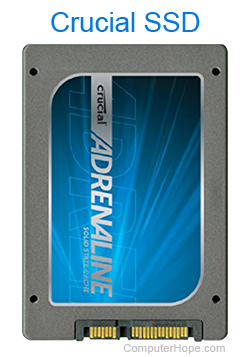 SSD - An SSD is much faster than a traditional hard drive. If your computer is capable of accommodating an SSD, we highly recommend an SSD.
HDD - With traditional hard drives, the speed is measured in RPM (Revolutions Per Minute). An example of this is a speed of 7,200 RPM. In general, the higher the RPM, the faster the hard drive. In other words, 7,200 RPM is faster than 5,400 RPM.
Hybrid - Hybrid hard disk drives are drives that combine the two technologies above in one drive.
Other considerations
Below is a listing of some other important considerations to look at when purchasing a computer hard drive.
Warranty - How long is the warranty and what does it cover.
Included components - Verify the hard drive comes with all the needed components. Most hard drives should include an extra cable and instructions. However, if you need a mounting bracket to mount a smaller drive in a larger bay, make sure you also purchase one of these with the drive.
Support - Verify if the technical support number is a free number, and if support is available 24 hours, seven days a week.
S.M.A.R.T. - S.M.A.R.T. is a technology used to help warn the computer user of possible problems with the hard drive.
Price range
The price can vary depending upon the type of hard drive (SSD or HDD), the interface, capacity of the drive, and speed of the drive. In general, drives can range from $70 to $300.
Ready to purchase
If after reviewing the information above, you believe you are ready to make a purchase of a new hard drive, verify the source where you are purchasing the hard drive is a reputable source.
To help support Computer Hope, purchase through Amazon.