
How to find hardware and other computer specifications
Finding the hardware installed in your computer may be necessary for many reasons. Whether it's determining if your computer meets minimum system requirements, checking the compatibility for upgrades, comparing your machine to another, or selling the computer. To check your hardware specifications, select your version of Windows below and follow the instructions.
Some information, like brand, power rating, or size, can be determined by looking at the hardware. For example, most hardware displays the brand somewhere on the front or side panel. The power rating of a power supply wattage output is often displayed on the side of the unit.
Although often correct, realize that information about computer hardware may be incorrect when viewed through a program. Also, any hardware that is overclocked displays the overclocked speed and not the original speed.
Windows Vista, 7, 8, 10, and 11 users
DxDiag

The DirectX Diagnostic Tool, or DxDiag, is included with DirectX and lets you display all system information and save it in an easy-to-read text file.
To access DxDiag, follow these steps.
- Press the Windows key+R to open the Run window.
- In the Run box, type "dxdiag" and press Enter.
Msinfo32
The Windows System Information (msinfo32) utility comes pre-installed with Windows and lets you view installed hardware and software specifications.
To access the System Information utility, follow these steps.
- Press the Windows key+R to open the Run window.
- In the Run box, type "msinfo32" and press Enter.
Device Manager
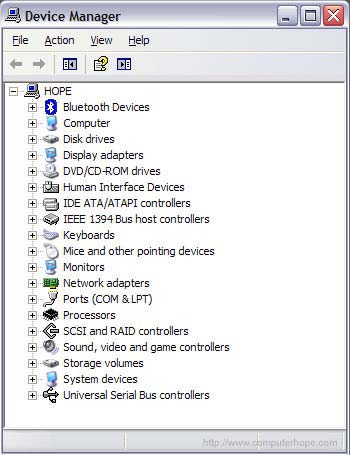
Generic hardware information detected by Windows is displayed in the Device Manager. If more detailed information is required, use a third-party utility. Below is an example of what the Device Manager looks like and what devices may be listed.
Third-party programs
If this program does not list the information you need, see the third-party program section on this page. It contains a list of programs that can be installed to detect and list the hardware and software on your computer.
Windows 98, Me, 2000, and XP users
DxDiag
The DirectX Diagnostic Tool, or DxDiag, is included with DirectX and lets you display all system information and save it in an easy-to-read text file.
To access DxDiag, follow these steps.
- Click Start to open the Start menu.
- Select the Run option.
- In the Run box, type "dxdiag" and press Enter.
Msinfo32
The Windows System Information (msinfo32) utility comes pre-installed with Windows and lets you view installed hardware and software specifications.
To access the System Information utility, follow these steps.
- Click Start to open the Start menu.
- Select the Run option.
- In the Run box, type "msinfo32" and press Enter.
Device Manager
Generic hardware information detected by Windows is displayed in the Device Manager. If more detailed information is required, use a third-party utility. Below is an example of what the Device Manager looks like and what devices may be listed.
Third-party programs
If this program does not list the information you need, see the third-party program section on this page. It contains a list of programs that can be installed to detect and list the hardware and software on your computer.
Windows 95 users
Device Manager
Generic hardware information detected by Windows is displayed in the Device Manager. If more detailed information is required, use a third-party utility.
Third-party programs
If this program does not list the information you need, see the third-party program section on this page. It contains a list of programs that can be installed to detect and list the hardware and software on your computer.
MS-DOS and Windows 3.x users
To see the computer's system specifications, run the msd command from an MS-DOS prompt. Note: As mentioned on the msd command page, this command is only meant for older computers running MS-DOS and not Windows computers running the Windows command line.
Third-party programs
Computer manufacturers such as Dell also have unique identification numbers (Service Tag) for use on the manufacturer's website to determine your system specifications.
There are third-party programs that enable users to display their system specifications and, in some cases, also benchmark their computer. Below are some programs and their capabilities listed in the order we recommend most.
Belarc Advisor
https://www.belarc.com/products/belarc-advisor
The Belarc free personal PC (personal computer) audit is a great and highly recommended program that creates a fantastic report of your computer hardware and software. Below lists what this program can detect and display.
- Operating system and system model type.
- Processor speed and primary and secondary cache amount.
- Motherboard type/chipset, controllers, bus clock speed, and BIOS (basic input/output system).
- Installed memory, including what size of chips and what bank they're installed into on the motherboard.
- Drives include hard drive manufacturer, size, SMART (Self-Monitoring Analysis and Reporting Technology) status, network drives, and other disc/diskette drives.
- Installed local and network printers and their paths.
- Installed video card and display.
- Installed sound card and other multimedia cards.
- Other connected devices (e.g., keyboard, mouse, USB (universal serial bus) devices).
- User accounts and last login date and time.
- Installed virus scanner and its version.
- Installed Microsoft security hotfixes and if any missing hotfixes are detected.
- Software license information.
- Installed software version.
Fresh Diagnose
https://www.freshdevices.com/
A great free method for determining your system specifications through software and benchmarking your hardware devices. The program can detect hardware such as the CPU (central processing unit), hard drive, video, sound, motherboard, and drive performance.
The program requires a valid e-mail address to download.
HWiNFO and HWiNFO32
https://www.hwinfo.com/
Another excellent software tool for getting a comprehensive list of your hardware information and is available as a 14-day free trial. HWiNFO can also display sensor information used for detecting the temperature of the motherboard, CPU, and other devices and displaying voltage and fan RPM (revolutions per minute) speeds. The program includes a benchmarking feature to compare your computer against other hardware.
FinalWire AIDA64
https://www.aida64.com/
Formerly Lavalys EVEREST, FinalWire AIDA64 is a program capable of displaying a complete list of the software and hardware installed on your computer and can run benchmarks. The program includes detection features similar to other programs listed on this page.
SiSoftware SANDRA
https://www.sisoftware.co.uk/
Short for System ANalyser Diagnostic and Report Assistant, SANDRA is an information and diagnostics program capable of listing the hardware in your computer.