
How to verify CD-ROM cables are correctly connected
There are different causes for cables becoming loose on your CD-ROM (Compact Disc Read-Only Memory) drive. Below are steps to check the connections on the back of a CD-ROM drive. Because these steps require opening your computer and work inside, make sure you're aware of the potential ESD (ElectroStatic Discharge) hazards by reviewing our ESD help page.
Opening the computer
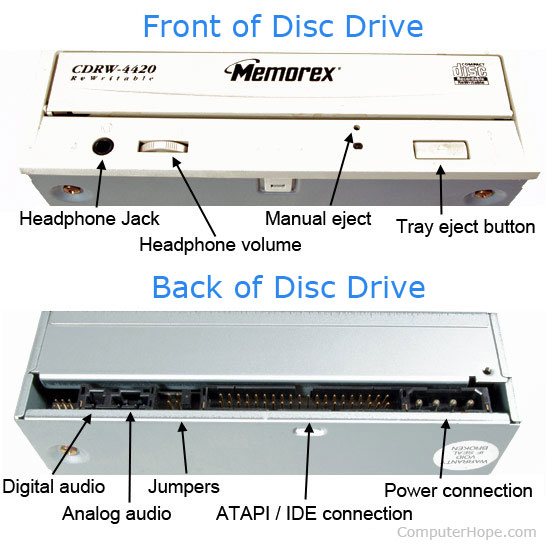
Open your computer and locate the CD-ROM and each of the cables connected to it. Below is an example of a disc drive, including where each of the cables should connect to the drive.
Verify connections
Your CD-ROM should have at least two cables connected to it: a Molex power cable and an ATAPI (AT Attachment Packet Interface) / IDE (Integrated Development Environment) or SATA (Serial AT Attachment) cable. The IDE or SATA cable connect to the motherboard or another interface card, and the power cable should connect to the power supply. Disconnect the cable from the back of the CD-ROM and reconnect it. Do the same on the opposite end of the cable, if possible.
Next, if your CD-ROM drive is not getting any power, disconnect the power cable from the back of the drive and reconnect it.
Finally, some computers may have a third cable to interface the CD-ROM with the sound card. If the audio for your audio CDs (Compact Discs) is not working correctly, verify this cable connects to the CD-ROM and sound card.
Check jumpers
If you recently installed any new disk drives, such as a new hard drive, verify that the jumpers are correctly set on the back of the CD-ROM. Having the jumpers set improperly to primary or secondary can cause the CD-ROM not to work. If no jumper settings are on the back, remove the drive and get the jumper settings from the sticker on top of the disc drive.
Most computers today do not have jumpers set on the CD drive, as they use a SATA cable, which has no primary or secondary settings in general. However, if your computer still uses an IDE cable, the setting is determined by the connector on the IDE cable the drive uses. In this case, it may not utilize the jumper settings.