
How to reduce the Windows font size if it's too big
Updated: 02/07/2022 by Computer Hope
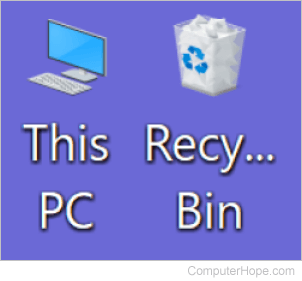
If the primary font size on your computer is increased, it can be difficult to read the text and navigate your desktop. Users can fix this issue through Windows settings in normal mode or safe mode if the font is too large to navigate.
Select your Windows operating system version below for specific instructions on decreasing the font size.
Windows 11
To reduce the Windows font size in Windows 11, follow the steps below.
- If the font size is so large that you cannot navigate the Windows operating system, boot the computer to Windows safe mode. Otherwise, continue to the next step while still in Windows normal mode.
- Access the Start menu and click the Settings
 option.
 - In the Settings window, click the Accessibility option in the left navigation menu.
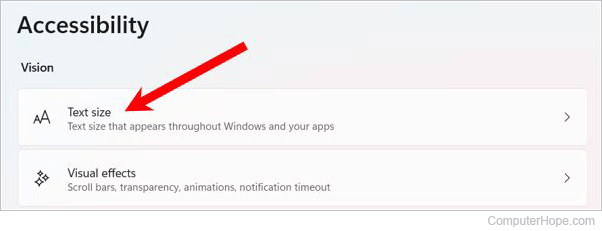
- On the right side of the Accessibility settings window, click the Text size option under the Vision section.
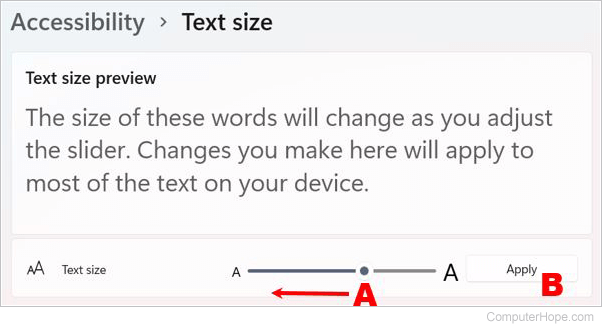
- In the Text size section, drag the slider bar (A) to the left to reduce the font size.
- Click Apply (B) below the slider bar to change the font size and verify it looks okay.
- Repeat steps 5 & 6 as needed to reduce the font size to the desired size.
- Close the Settings window.
- If you booted your computer to Windows safe mode, restart the computer to resume Windows normal mode.
Windows 10
To reduce the Windows font size in Windows 10, follow the steps below.
- If the font size is so large that you cannot navigate the Windows operating system, boot the computer to Windows safe mode. Otherwise, continue to the next step while still in Windows normal mode.
- Access the Start menu and click the Settings icon.
- In the Settings window, click the Ease of Access option.
- The Display settings should be shown. If not, select Display in the left navigation menu.
- Under the Make text bigger section, drag the slider bar (A) to the left to reduce the font size.
- Click Apply (B) below the slider bar to change the font size and verify it looks okay.

- Repeat steps 5 & 6 as needed to reduce the font size to the desired size.
- Close the Settings window.
- If you booted your computer to Windows safe mode, restart the computer to resume Windows normal mode.
Windows 8
To reduce the Windows font size in Windows 8, follow the steps below.
- If the font size is so large that you cannot navigate the Windows operating system, boot the computer to Windows safe mode. Otherwise, continue to the next step while still in Windows normal mode.
- Right-click an empty area of the Windows desktop and select Personalize in the pop-up menu.
- At the bottom-left of the Personalization window, click the Display link.
- In the Display window, under the Change only the text size section, click the left drop-down menu and select an object that you want to reduce the font size.
- Click the font size drop-down menu next to the object selection list and select the desired font size for that object.
- Repeat steps 4 & 5 as needed to reduce the font size of each type of Windows object.
- Click the Apply button to apply the font size changes and close the Display window.
- If you booted your computer to Windows safe mode, restart the computer to resume Windows normal mode.
Windows 7
To reduce the Windows font size in Windows 7, follow the steps below.
- If the font size is so large that you cannot navigate the Windows operating system, boot the computer to Windows safe mode. Otherwise, continue to the next step while still in Windows normal mode.
- Right-click an empty area of the Windows desktop and select Personalize in the pop-up menu.
- At the bottom-left of the Personalization window, click the Display link.
- In the Display window, select one of the three scaling options.
- Smaller - 100%
- Medium - 125%
- Larger - 150%
- If you prefer to select a custom font size, click the Set custom text size (DPI) link on the left side of the Display window, select a custom scaling percent, and click OK.
- Click the Apply button to apply the font size changes and close the Display window.
- You are prompted to log out of Windows. Click Log off now to log out.
- If you booted your computer to Windows safe mode, restart to resume Windows normal mode. Otherwise, log in to Windows again.