
How to regain computer hard drive space
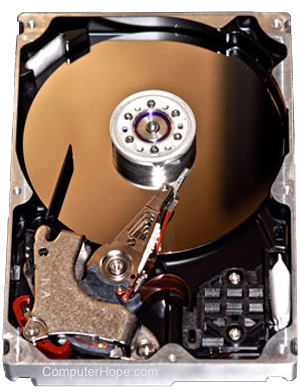
Most of us run out of storage space at some point. When you do, knowing how to clean up your computer properly is good. The following sections show how to regain computer hard drive space. To proceed, select your operating system from the following list.
Windows Vista, 7, 8, 10, and 11
There are a few options for clearing space in Windows.
Run the Disk Cleanup option
- Press the Windows key, type Disk Cleanup, and press Enter.
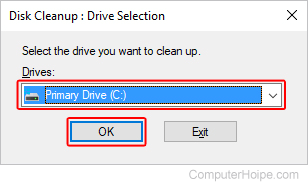
- Select the drive you need extra space on, and click OK.
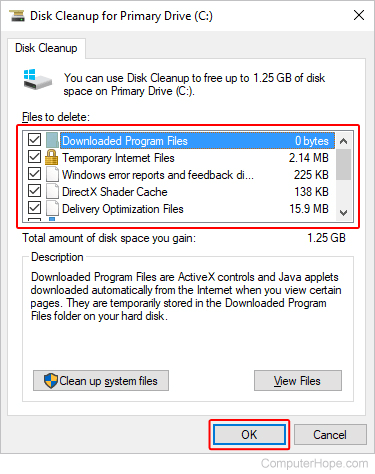
- In the Disk Cleanup window, check the box next to the items using up disk space, and click OK.
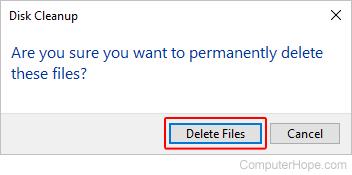
- When prompted, click the Delete Files button.
Uninstall old programs
Uninstalling programs and games you no longer use helps to regain a lot of disk space.
Turn off System Restore
Windows users can also reduce the default space utilized by Windows System Restore and can gain several gigabytes of hard drive space. See the steps below for your version of Windows to turn off system restore.
Windows 11
- Press the Windows key, type restore point, and press Enter.
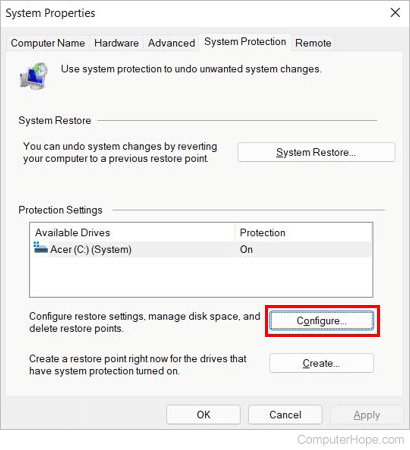
- In the System Properties window, click the Configure button on the System Protection tab.
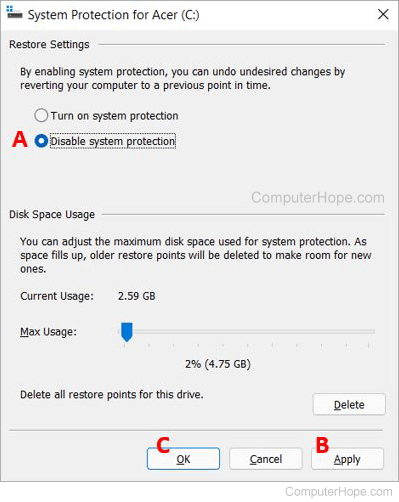
- In the System Protection window that opens, select the Disable system protection option (A).
- Click the Apply button (B) and click OK (C) to disable system restore.
Windows 8 and 10
- Press the Windows key, type restore point, and press Enter.
- In the System Properties window, click the Configure button on the System Protection tab.
- In the System Protection window that opens, select the Turn off system protection option.
- Click the Apply button, and click OK to disable system restore.
Windows XP, Vista, and 7
- Click Start, Programs, Accessories, System Tools, and select System Restore.
- In the System Restore window, click System Restore Settings.
- On the System Restore tab, select the Turn off System Restore on all drives option to disable this feature completely, or click the Settings button and decrease the disk space usage. We recommend the second option.
Move the swap file
If you have more than one hard drive in the computer and the C: drive is the drive running out of space, consider moving the swap file to another drive.
Disable hibernation
If you turn your computer off instead of using hibernation mode, disable this feature to free up space.
Windows 2000 and XP
There are a few options for clearing space in Windows XP and Windows 2000.
Run the Disk Cleanup option
- Open Windows Explorer.
- Right-click the hard drive where you want to regain hard drive space. For example, right-click the C: drive.
- Select Properties.
- In the General tab, click the Disk Cleanup button next to the pie chart.
- In the Disk Cleanup window, check the box next to the items (except "compress old files") that are using up disk space, click OK, and click Yes to proceed.
Compress?
When performing a Disk Cleanup, there is an option to compress your hard drive. We strongly recommend users do not compress their hard drive or old files.
Uninstall old programs
Uninstalling programs and games you no longer use helps to regain a lot of disk space.
Disable System Restore
Windows XP users can also reduce the default space utilized by Windows System Restore, gaining several gigabytes of hard drive space. See the steps below for customizing this feature.
- Click Start, Programs, Accessories, System Tools, and open System Restore.
- In the System Restore window, click System Restore Settings.
- In the System Restore tab, select the Turn off System Restore on all drives option to disable this feature completely or click the Settings button to decrease space usage. We recommend the second option.
Additional suggestion for Windows 2000 and Windows XP users
Windows 2000 and Windows XP keeps all the necessary files to uninstall any updates installed on the computer. These files can take up several hundred megabytes and sometimes over a gigabyte of space on your hard drive.
Move the swap file
If you have more than one hard drive in the computer and the C: drive is the drive running out of space, consider moving the swap file to another drive.
Disable hibernation
If you turn your computer off instead of using hibernation mode, disabling this feature helps free up space.
Microsoft Windows 95, 98, and Me
There are a few options for clearing space in Windows Me, Windows 98, and Windows 95.
Clean up temporary files
- Click Start and click Search or Find.
- In the File type text field, type *.tmp and verify the computer is looking at the C: drive or the drive containing your operating system.
- Search for files and delete each of the temporary files.
Delete chk files
Perform the same steps above, except search for *.chk and delete all the found files.
Uninstall old programs
Uninstalling programs and games you no longer use helps to regain a lot of disk space.
MS-DOS and Windows 3.x
- From the MS-DOS prompt, type del *.tmp /s and del *.chk /s to delete any temporary files on the hard drive.
- Delete any programs or games you are no longer using.
macOS
There are a few options for clearing space on your iMac or MacBook. However, these processes vary depending on which version of Apple's operating system is on your machine. To proceed, select the appropriate entry from the list below and follow the steps. If you're unsure which version is on your device, see our page: How to determine the version of macOS on a computer.
Clearing space in Ventura and Sonoma
Here is how to manage storage space in macOS versions 13 and 14.
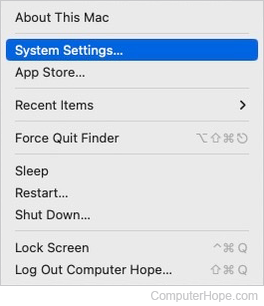
- At the top-left corner of the desktop screen, click the Apple icon.
- Select System Settings from the Apple menu.
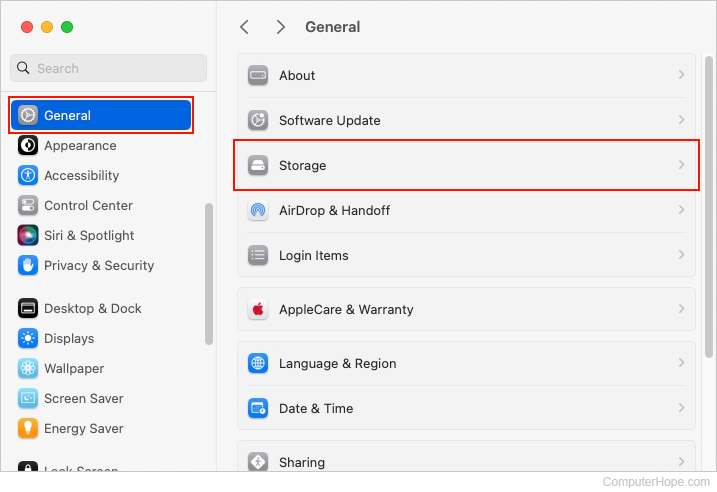
- In the sidebar, scroll down and click the General selector. Then, in the right section under General, click the Storage selector.
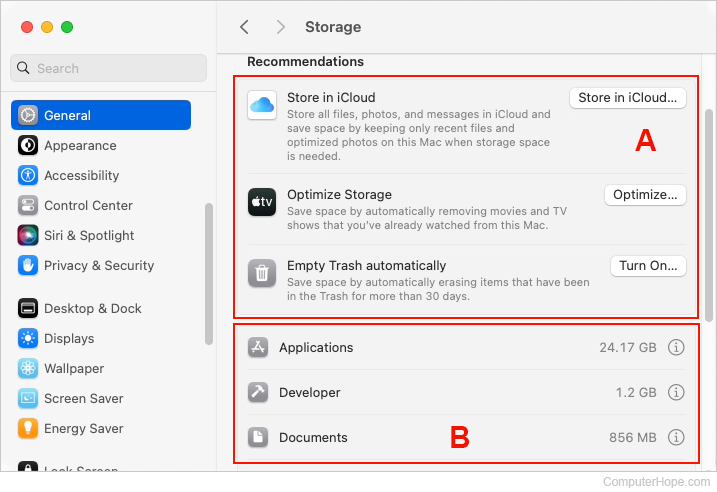
- In the right section, under Recommendations, there are several options like Store in iCloud, Optimize Storage, and Empty Trash automatically (A). These can all help regain storage. The second section (B) contains specific areas where you may delete files, folders, and applications to free up space.
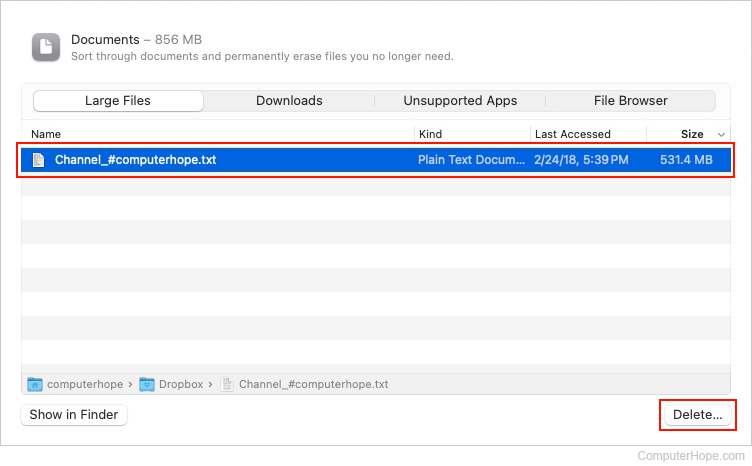
- In the example below, we entered the Documents section by double-clicking it. Here, highlight one or more documents, and then remove them by clicking the Delete button.
- Repeat the steps above under multiple entries to clear out unnecessary clutter in your disk storage and restore free space for new media.
Clearing space in High Sierra, Mojave, Catalina, Big Sur, and Monterey
Here is how to manage storage space in macOS versions 10 through 12.
- In the menu bar at the top of the screen, click the Apple icon to open the Apple menu.
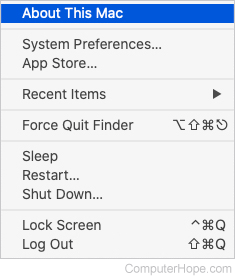
- In the Apple menu, select About This Mac.
- In the System Information window that opens, click the Storage tab at the top.
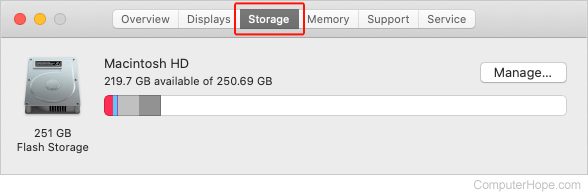
- Click the
 button on the right side.
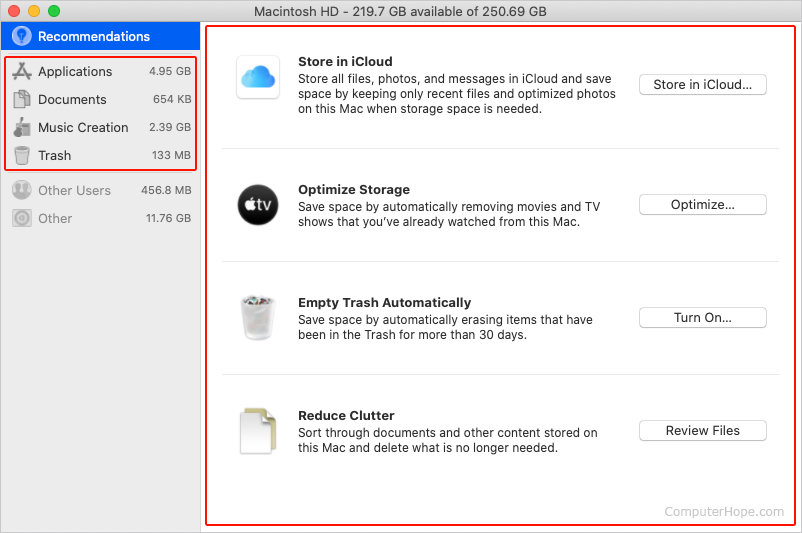
 - The following menu shows management options for your hard drive. Follow Apple's recommended steps for clearing space, or choose one of the tabs on the left side and select items on your own.
Uninstall old programs
Uninstalling programs and games you no longer use helps to regain a lot of disk space.