
How to see all drives available on the computer
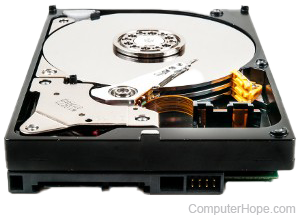
Computers often have more than one drive, including CD (compact disc) or DVD (digital versatile disc) drives and hard drives. To view all the drives connected to your computer and their status (e.g., available drive or disk space), select your operating system in the list below.
This page provides information on determining which drives and drive letters your computer currently uses. It is not a list of all possible drive letters.
If you don't see a specific drive listed when following the instructions below, it's likely that the drive is not connected properly or is defective and not working correctly.
Windows 11, 10, and 8
If you're running Windows 11, Windows 10, or Windows 8, you can view all mounted drives in File Explorer. You can open File Explorer by pressing Windows key+E. In the left pane, select This PC, and all drives are shown on the right. The screenshot shows a typical view of This PC, with three mounted drives.
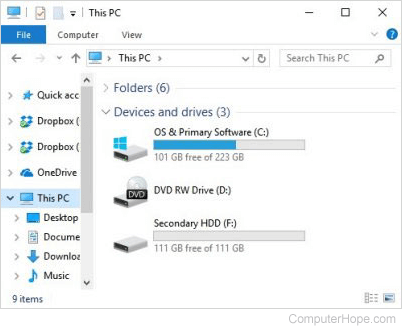
OS & Primary Software (C:)
In our first example, the C: and F: drives are hard drives, listed as primary and secondary. Most computers only have a C: drive. The hard drive is the primary location where all files are stored on your computer. To open the drive, double-click the drive.
In our example, the drives are labeled "Local Disk" and "New Volume." A hard drive can be labeled anything and may be different on your computer. For steps to change your drive's name, see: How to rename or label a disk drive.
All new computers no longer have a floppy drive (A: or B:), but still start with the C: drive by default. For why a computer starts with the C: drive, see: Why is the hard drive the C: drive?
DVD RW Drive (D:)
The D: drive in this example is the optical disc drive installed in the computer. In most situations, the disc drive will be the last drive letter. If a disc is in the drive, the contents of that disc are shown if you double-click the drive icon.
If the drive AutoPlays the disc, right-click the drive and click Explore.
How to locate an external hard drive, memory card, or USB Drive on your computer
As long as an external hard drive, memory card, or USB drive is connected to the computer or network, they should appear in File Explorer. The external drive or USB is usually labeled as "external hard drive," "USB Drive," or has the manufacturer of the drive listed in the drive name.
Other areas in Windows
In addition to the File Explorer, users can also use the following areas in Windows to view available drives.
- Disk Management (view drives and partitions).
- System Information
Windows users can also list available drives through the command line.
Windows 7 and earlier
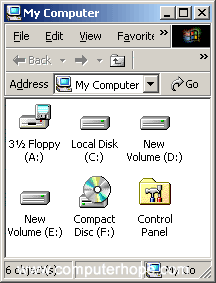
Microsoft Windows 7, Vista, XP, and earlier users can identify which drives Windows has detected by opening File Explorer and then My Computer, or by pressing Windows key+E. The picture shows My Computer. As you can see in this example, three different drive types are listed.
In Windows 7 and earlier versions, you can access My Computer (Computer) by double-clicking the icon on the desktop. Or, open the Start menu, and select My Computer or Computer, depending on the version of Windows you're using.
3 1/2 Floppy (A:)
If the computer has a floppy disk drive, this drive is visible and usually set as the A: drive. If any floppy diskette is in the computer and the A: drive is opened, its contents are shown.
All new computers no longer have a floppy drive (A: or B:) but still start with the C: drive by default. For why a computer starts with the C: drive, see: Why is the hard drive the C: drive?
Local Disk (C:), New Volume (D:), and New Volume (E:)
Next, in our example, the C:, D:, and E: drives are hard drives or hard drive partitions on the computer. Most computers only have a C: drive. The hard drive is the primary location where all files are stored on your computer.
In our example, the drives are labeled "Local Disk" and "New Volume." A hard drive can be labeled anything and may be different on your computer. For steps to change your drive's name, see: How to rename or label a disk drive.
Compact Disc (F:)
Finally, the F: drive in this example is the optical disc drive installed in the computer. In most situations, the disc drive is the last drive letter. If a disc is in the drive, the contents of that disc are shown if you double-click the drive icon.
If the drive AutoPlays the disc, right-click the drive, and click Explore.
Other areas in Windows
In addition to the File Explorer, users can also use the following areas in Windows to view available drives.
- Disk Management (view drives and partitions).
- System Information
Windows users can also list available drives through the command line.
Windows 3.0, 3.1, and 3.11
Windows 3.0, 3.1, and 3.11 users can open drives through the Windows File Manager. In the File Manager, click the drive icons above the folder and files. By default, the C: drive will be open. To move to the floppy disk drive, click the A: drive icon. If you're going to open the CD drive, click the D: CD-ROM (compact disc read-only memory) drive icon.
MS-DOS and Windows command line
Windows Vista and later command line users
If you're using Windows Vista, 7, 8, 10, or 11, use the wmic command at the Windows command line to view available drives on the computer. At the prompt, type the following command.
wmic logicaldisk get name
Or, for a little more information, such as volume size, use this command:
wmic logicaldisk list brief
Other Windows command line and MS-DOS version users
Unfortunately, there is no easy way to list all available drives on the computer through the MS-DOS prompt with one command. Below are different recommendations for viewing drives.
Change drive letter
Change the drive to an alternate drive letter to determine if a drive is available and ready if no error message is received.
Fdisk
Running the fdisk command lets you view how the hard drives are set up and configured on the computer. However, this command is only possible if you're running a version of MS-DOS or Windows that supports fdisk.
vol
Running the vol command on a drive displays the drive label and serial number, if available. This command lets you see what drives are detected.
Apple macOS
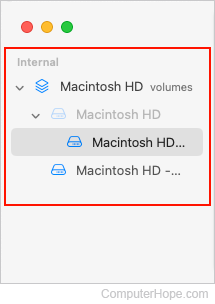
The most comprehensive way to view drives in macOS is through the Disk Utility. Here is how to open it:
- In the Utilities window that opens, double-click the Disk Utility icon.
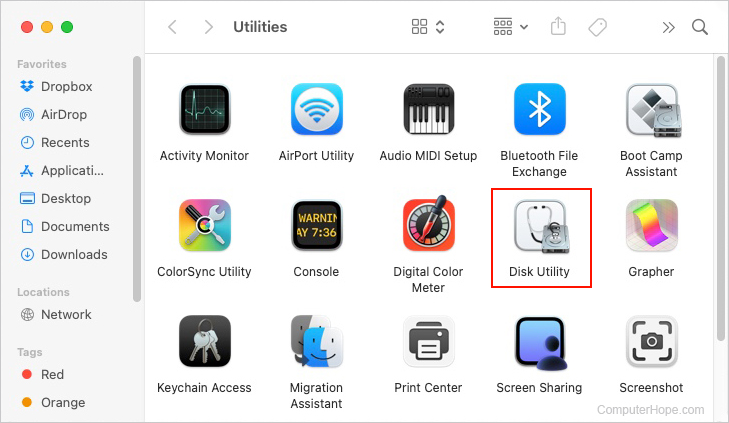
- In the new window, the left third shows all available drives and their associated volumes.
Apple desktop and laptop users may also press the Shift+Command+C keyboard shortcut to open the Computer window that also displays available drives.
Linux
Linux users can use the fdisk command to see their partition and drive information.