
Autocomplete
Alternatively called word completion, autocomplete is a software feature that suggests finishing what is being typed by comparing the current text with previously-entered text. As shown in the example image below, when a user types the letter "c" in the Computer Hope search bar, autocomplete displays matches based on previous searches.
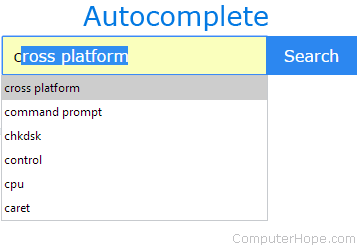
Pressing the Down arrow key lets you move through the autocomplete suggestions. Once you find the option you want, press the Enter key to complete the text entry. If you are entering text in a search or single text field, pressing Enter again submits the request.
Autocomplete should not be confused with autofill. Autocomplete is an Internet browser feature that stores data for populating multiple fields in a form, such as addresses, or login information, like usernames and passwords.
Where is autocomplete used?
- Web page addresses - Autocomplete for URLs typed in the address bar
- Search queries - If you've entered a word or phrase in a search box, the next time you start to type it, it is suggested.
- Command line - In a command line all navigation is done with typing. Command completion (often done with Tab) completes commands, file names, and directories.
- Text messages - Sometimes called predictive text, all mobile devices (smartphones, tablets, etc.) make suggestions as you type a message.
Address bar, Auto, AutoCorrect, Autofill, AutoFormat, AutoText, Internet terms, Software terms