
DNS
Short for domain name system, a DNS is a service that receives a request containing a domain name hostname and responds with the corresponding IP address. The first DNS was designed and implemented by Paul Mockapetris and Jon Postel in 1983.
DNS uses port 53.
How does DNS work?
When a user wants to visit Computer Hope, they can type "https://www.computerhope.com" into the address bar of their browser. Once that domain name is entered, it is looked up on a Domain Name System where it is translated into an IP address (e.g., 216.58.216.164). Using that IP address, your computer can then locate the Computer Hope web page and forward that information to your browser. Below is a visual example of how DNS works.
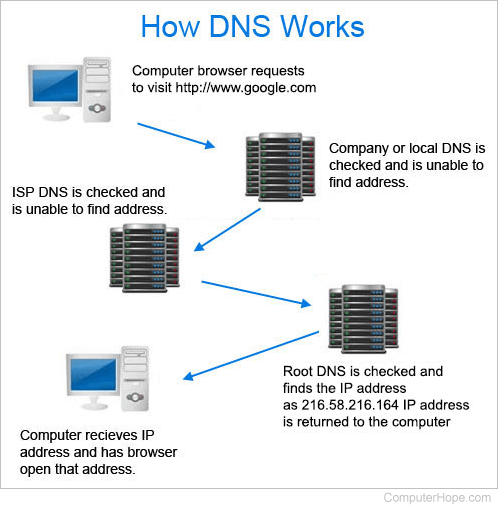
As seen above, not every DNS stores every address on the Internet. If a domain name is not found, the server may query other domain servers to obtain its address.
What is the hierarchical structure of DNS?
There are millions of websites available on the Internet to make finding an address the domain naming is broken into a hierarchical structure. Below is how DNS is structured on the Internet and an example of three different addresses.
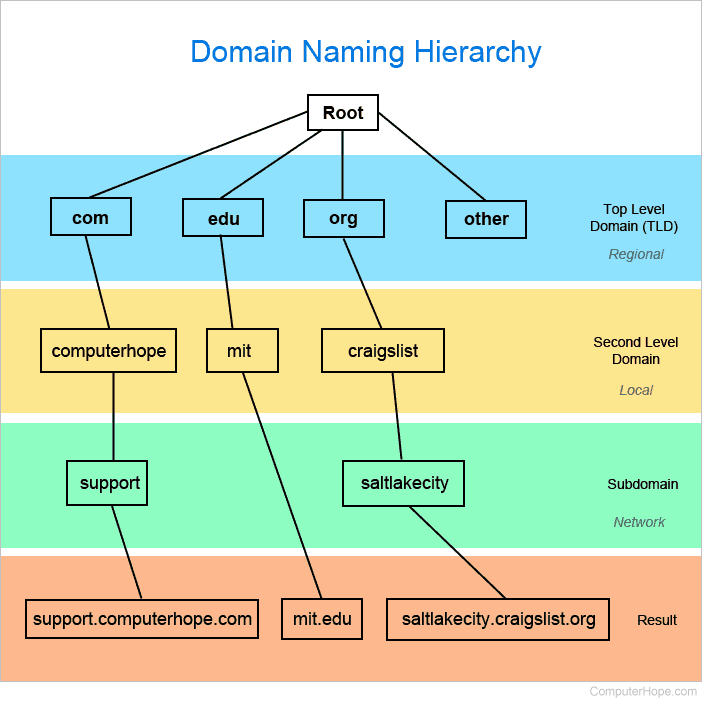
In the example above, all websites are broken into regional sections based on the TLD (top-level domain). With http://support.computerhope.com it has a ".com" TLD, with "computerhope" as its second level domain (local to the .com TLD), and "support" as its subdomain determined by its server.
Difference between a domain name system and domain name server
The DNS acronym can be used for "Domain Name System" and "domain name server" and although they share the same acronym they have different meanings. A Domain Name System is the overall system used to make a domain name an IP address as explained above. A domain name server is an individual server that is part of the Domain Name System, which may be comprised of multiple domain name servers.
A record, CNAME, Computer acronyms, Database, DNS hijacking, DNS record, DNS resolver, Domain, Domain namespace, Hosts file, MX record, Nameserver, Network terms, Port, rDNS, SOA, Web design terms, WINS