
Computer keyboard shortcuts

Shortcut keys ABCs
Shortcut keys provide an easier and quicker method of navigating and executing commands in the computer software. Shortcut keys are performed using Alt (on IBM-compatible computers), Command (on Apple computers), Ctrl, or Shift with another key. The de facto standard for listing a shortcut is listing the modifier key, a plus symbol, and another key. In other words, "Ctrl+S" tells you to press and hold Ctrl and press S simultaneously.
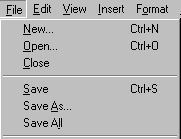
The shortcut keys in popular programs are usually found by looking for underlined letters in their menus. For example, the file menu image has an underline on the "F" in File, which means press Alt and F to access the file menu.
Some programs require users to press and hold Alt to see the underlined characters. The image above shows some standard features, such as Open (Ctrl+O) and Save (Ctrl+S), have shortcut keys assigned to them. As you memorize shortcut keys, you'll notice that many applications share them. We have a list of the most commonly shared ones in the basic PC shortcut keys section.
Non-English versions of Microsoft Windows may be unable to use all the shortcut keys below.
Basic PC shortcut keys
Below are commonly used basic shortcut keys that work with IBM-compatible computers and software. We highly recommend all users keep a reference to these shortcut keys or try to memorize them. Doing so can dramatically increase your productivity.
Besides the special character shortcuts listed here, some are also on the number keys (below the F1 - F12 keys). Enter these special characters by pressing the Shift key and the number key with the special character listed.
| Shortcut Keys | Description |
|---|---|
| Alt+F | File menu options in the current program. |
| Alt+E | Open Edit options in the current program. |
| Alt+Tab | Switch between open programs. |
| F1 | View help information (F1 is used by almost every Windows program to display help). |
| F2 | Rename a selected file. |
| F5 | Refresh the current program window. |
| Ctrl+D | Bookmark the current page in most Internet browsers. |
| Ctrl+N | Create a new or blank document in some software or open a new tab in most Internet browsers. |
| Ctrl+O | Open a file in the current software. |
| Ctrl+A | Select all text. |
| Ctrl+B | Change the selected text to bold or remove bold. |
| Ctrl+I | Change the selected text to italics or remove italics. |
| Ctrl+U | Change selected text to underlined or remove underline. |
| Ctrl+F | Open the find window for the current document, web page, or window. |
| Ctrl+S | Save the current document file. |
| Ctrl+X | Cut the selected item. |
| Shift+Del | Cut the selected item. |
| Ctrl+C | Copy the selected item. |
| Ctrl+Ins | Copy the selected item. |
| Ctrl+V | Paste |
| Shift+Insert | Paste |
| Ctrl+Y | Redo the last action. |
| Ctrl+Z | Undo the last action. |
| Ctrl+K | Insert hyperlink for the selected text. |
| Ctrl+P | Print the current page or document. |
| Home | Go to the beginning of the current line. |
| Ctrl+Home | Go to the beginning of the document. |
| End | Go to the end of the current line. |
| Ctrl+End | Go to the end of the document. |
| Shift+Home | Highlight from the current position to the beginning of the line. |
| Shift+End | Highlight from the current position to the end of the line. |
| Ctrl+← | Move one word to the left at a time. |
| Ctrl+→ | Move one word to the right at a time. |
| Ctrl+Esc | Open the Start menu. |
| Ctrl+Shift+Esc | Open Windows Task Manager. |
| Alt+F4 | Close the currently active program. |
| Alt+Enter | Open the properties for the selected item (file, folder, shortcut, etc.). |
| Windows key+L | Lock the computer, requiring password entry to access again. |
| Windows key+X | Access the Power User Tasks Menu in Windows 8 and Windows 10. |
| Windows key+↓ | Minimize the active program window. |
| Windows key+↑ | Maximize the active program window. |
PC shortcut keys for special characters
Many special characters can be created using keyboard shortcuts. Below are special characters and the keyboard shortcuts to create them.
| Shortcut Keys | Special Character |
|---|---|
| Alt+0224 | à |
| Alt+0232 | è |
| Alt+0236 | ì |
| Alt+0242 | ò |
| Alt+0241 | ñ |
| Alt+0228 | ä |
| Alt+0246 | ö |
| Alt+0252 | ü |
| Alt+0248 | ø |
| Alt+0223 | ß |
| Alt+0198 | Æ |
| Alt+0231 | ç |
| Alt+0191 | ¿ |
| Alt+0176 | ° (degree symbol) |
| Alt+0177 | ± (plus/minus symbol) |
| Alt+0153 | ™ |
| Alt+0169 | © |
| Alt+0174 | ® |
| Alt+0128 | € (Euro currency) |
| Alt+0162 | ¢ (Cent symbol) |
| Alt+0163 | £ (British Pound currency) |
| Alt+0165 | ¥ (Japanese Yen currency) |