
Task Manager
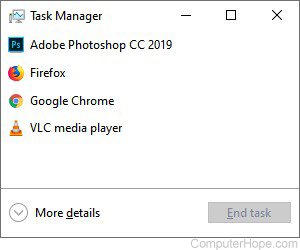
The Task Manager is an operating system component found in all versions of Microsoft Windows since Windows NT 4.0 and Windows 2000. It lets you view each of the tasks (processes) and the overall computer's performance. Using the Task Manager, you can view how much memory a program is using, stop a frozen program, and view available system resources.
If you are more familiar with Apple computers, you can think of the Task Manager as the Activity Monitor.
How to open the Windows Task Manager
The Task Manager is opened by pressing Ctrl+Shift+Esc on the keyboard. You can also open the Task Manager by right-clicking the taskbar and selecting Task Manager.
Another way to open the Task Manager is by pressing Ctrl+Alt+Del on the keyboard and selecting Task Manager or Start Task Manager.
Windows 8 and Windows 10 users can also access the Task Manager by right-clicking Start or pressing Windows Key+X to access the power user task manager. In this menu, you can access the Task Manager.
In Windows Vista and later versions, click Start, type taskmgr in the Search text box, and select the taskmgr.exe or Task Manager option in the search results.
In Windows XP and earlier versions, Task Manager can also be executed by running the taskmgr.exe file from the C:\Winnt\System32 directory or by clicking Start > Run, typing taskmgr, and pressing Enter.
Early versions of Microsoft Windows (Microsoft Windows 3.x, Windows 95, Windows 98) had a program called tasks to display the programs currently running. This program was executed by running the taskman.exe file from the C:\Windows directory.
Visual examples of Task Manager
Below are visual examples of the Task Manager in Windows 2000, Windows 7, Windows 8, and Windows 10.
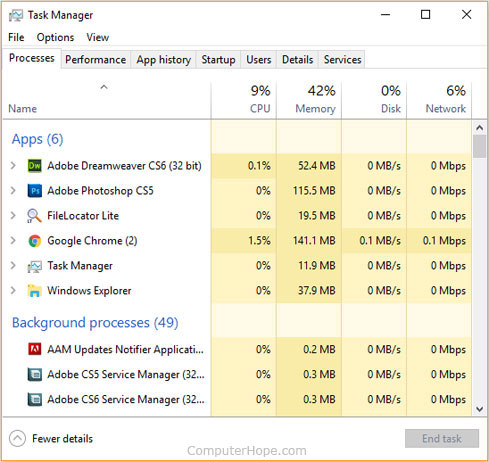
Windows 10 Task Manager
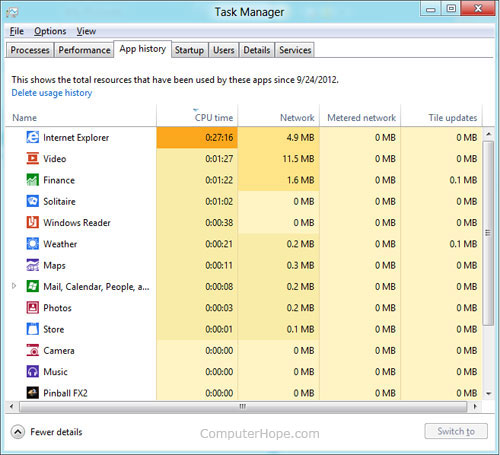
Windows 8 Task Manager
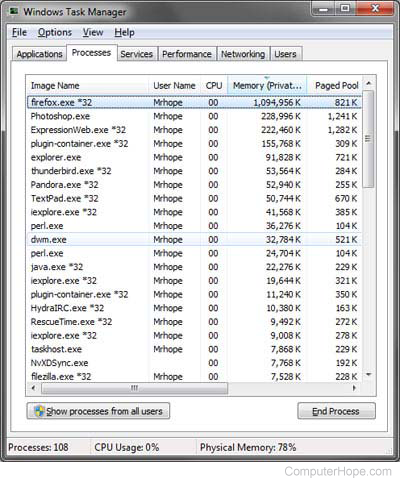
Windows 7 Task Manager
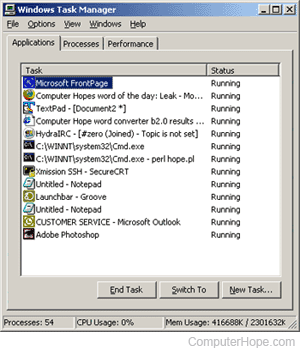
Windows 2000 Task Manager
Explanation of the tabs in Task Manager
Below explains each of the tabs found in all versions of the Windows Task Manager window and its ability.
Applications tab
The Applications tab is included in all versions of Windows, except Windows 8 and Windows 10, and shows all open programs running on the computer. For most users of Windows 7 and earlier, the Applications tab is the most visited tab. It displays the programs running, including those that stop responding and require you to End Task it. Windows 8 and 10 users can find the End Task on the Processes tab.
Processes tab
The Processes tab is in all versions of Windows, including Windows 8 and Windows 10, and shows all Windows processes currently running on the computer. Starting with Windows 8, Microsoft combined the Applications and Processes tab, hence the reason the Applications tab does not appear in Windows 8 or 10.
Services tab
The Services tab shows all the Windows Services currently running on the computer.
Performance tab
The Performance tab displays the computer's available system resources, including how much CPU (Central Processing Unit), memory, disk drive, Wi-Fi, and network is used. Newer versions of Windows also show the chart of usage for each of these as they're used. At the bottom of this tab is also a quick link to the Resource Monitor.
Networking tab
The Networking tab in all versions of Windows, except Windows 8 and Windows 10, shows network traffic happening on the computer, including any LAN (Local Area Network) or Wireless networking traffic.
In the Windows 8 and Windows 10 Processes tab, Network usage may be viewed in the Task Manager, under More details.
Users tab
The Users tab shows all the users logged in to the computer. In Windows 8, the Users tab also shows the processes that each user is running.
App history tab
The App history tab was introduced in Windows 8. It shows the overall history of each of the Windows Apps (not traditional Windows programs) that have run on the computer.
Startup tab
The Startup tab was introduced with Windows 8 and shows each program that starts with Windows and its impact on the load time. From the Startup tab, you can also disable the startup programs from this section of Task Manager.
Details tab
The Details tab was introduced with Windows 8 and has full details of each of the processes running on the computer.
What to do in the Task Manager?
One of the most common things done in Task Manager is using End Task to stop a program from running. If a program is no longer responding, you can choose to End Task from the Task Manager to close the program without having to restart the computer.
Why are there duplicate processes listed in Task Manager?
Some programs may break parts of the program out as a separate process. For example, the Google Chrome browser loads each of the open tabs into its own process to help make the program more secure and stable. There is nothing wrong with the computer if you see more than one of the same processes open at the same time.
Why am I unable to open the Task Manager?
If you're encountering issues opening the Task Manager, the computer could be infected with a virus or spyware. There is known malware designed to cause issues with opening the Task Manager and end tasking them. If you cannot open Task Manager using any of the recommendations on this page, we suggest scanning your computer for viruses and spyware.
It could also be possible that the Task Manager file in Windows is corrupted, preventing it from running. To fix this problem, revert Windows to a previous restore point where the Task Manager was last working or run a Windows repair installation. For help with restoring Windows, see: How to restore Windows to an earlier copy.
How to get even more control of the Windows processes
The Windows Task Manager is an excellent tool for almost all Windows users. However, there are times where more experienced users may need additional details and information about the processes running on their computer. For these situations, we highly recommend the free Process Explorer utility from Microsoft that is part of the Sysinternals.
Is it possible to copy the text in the Task Manager?
You can use a tool like GetWindowText from SoftwareOK to grab text within a window like the Task Manager.
CAM, End process, End Task, Manager, Operating system terms, Performance monitor, Process explorer, Resource monitor, Task, Task list, Task scheduler, Windows Accessories