
How to find how much RAM is installed on a computer
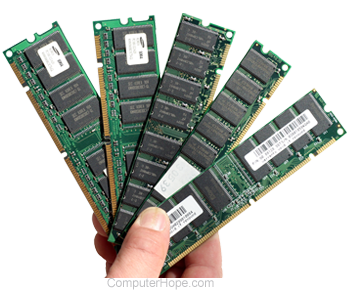
To view how much RAM (random-access memory) is installed and available on your computer, follow the steps below.
Memory is not the same as disk space. If you are having disk space issues, see: How to find how much hard drive space is available.
Windows 11, 10, and 8
To view the total memory on a computer running Windows 11, Windows 10, or Windows 8, follow the steps below.
- In Windows 11, click the magnifying glass icon on the taskbar and type ram in the Windows search box at the top of the window. Select the View RAM info option from the search results.
In Windows 10 and Windows 8, press the Windows key and type ram in the Windows search box. Select the View RAM info option from the search results.
Alternatively, press Windows key+I to open the Settings app, then click the System option and select About in the left navigation menu.
- In the System Properties window, look for Installed RAM in Windows 11 and Windows 10, or Installed memory (RAM) in Windows 8.
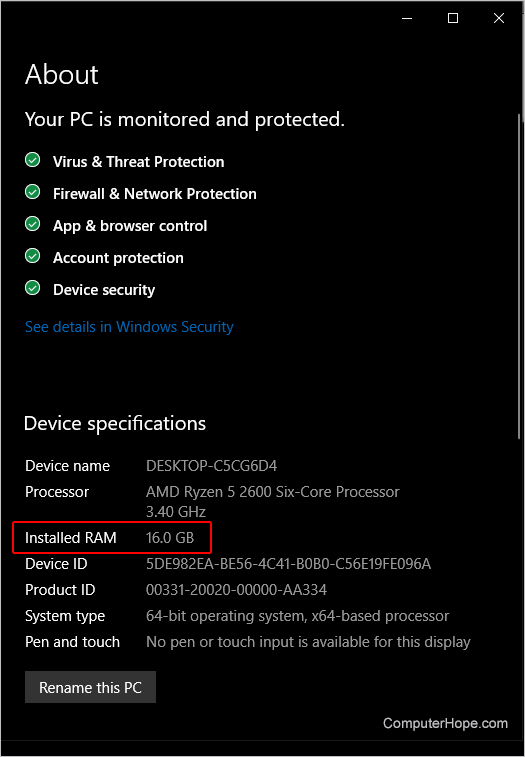
If the computer does not recognize the memory, it won't be included in the "Installed RAM" or "Installed memory (RAM)" entry in the System Properties window.
View used and available resources
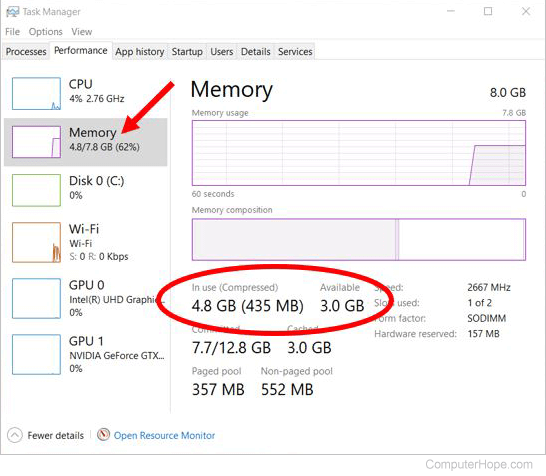
To determine the available system resources, including memory, and what is currently being utilized, open the Task Manager. The Processes tab displays which programs are running and how much memory they're utilizing is displayed. On the Performance tab is an overview of all the system resources. Click the Memory tab on the left side to see how much memory is used under the In use (Compressed) label, and what's available under the Available label.
Windows 7 and Vista
To view the total memory on a computer running Windows 7 or Windows Vista, follow the steps below.
- Press the Windows key, type Properties, and press Enter.
- In the System Properties window, the Installed memory (RAM) entry displays the total amount of RAM installed in the computer. For example, in the picture below, there is 4 GB of memory installed in the computer.
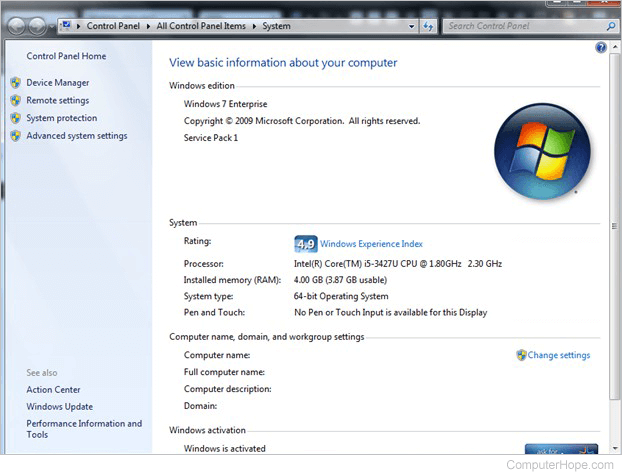
If the computer does not recognize the memory, it won't be included in the "Installed memory (RAM)" entry in the System Properties window.
or
- Click Start.
- In the Search box, type ram and click the Show how much RAM is on this computer entry in the search results.
or
- Click Start.
- Click System and Security
- Under System, click View amount of RAM and processor speed.
View used and available resources
To determine the amount of available system resources, including memory, and what is currently being utilized, open the Task Manager. The Processes tab displays which programs are running and how many resources they are using. On the Performance tab is an overall picture of all the system resources. Click Memory on the left side to see how much memory is used under the In use (Compressed) label, and what's available under the Available label.
macOS
To view the total memory on a computer running macOS, follow the steps below.
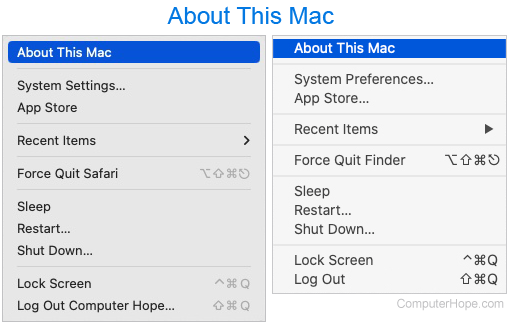
- In the menu bar at the top of the screen, click the Apple icon to open the Apple menu.
- In the Apple menu, select About this Mac.
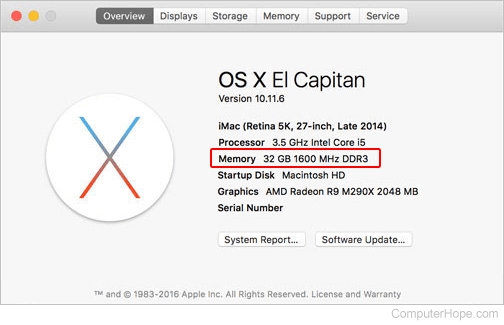
- The system overview is displayed, including the amount of RAM currently installed.
Linux
To view the total memory on a computer running Linux, use the free or top commands.
- Open a terminal and run free -h to view memory stats, including total RAM and swap.
free -h
        total     used      free    shared   buff/cache  available
Mem:     985M     154M      182M    5.6M     647M        682M
Swap:    511M      12K      511M
- Or, run top, and press m to display total and available memory.
top
top - 12:36:53 up 1 day, 17:08,  1 user,  load average: 0.00, 0.00, 0.00
Tasks:  99 total,   2 running,  55 sleeping,   0 stopped,   0 zombie
%Cpu(s):  0.3 us,  0.3 sy,  0.0 ni, 99.3 id,  0.0 wa,  0.0 hi,  0.0 si,  0.0
KiB Mem :  1008704 total,   187512 free,   157684 used,   663508 buff/cache
KiB Swap:   524284 total,   524272 free,       12 used.   698800 avail Mem
Windows XP, 2000, NT4, 98, 95, and Me
To view the total memory on a computer running Windows XP, 2000, NT4, 98, 95, or Me, follow the steps below.
- Open the Control Panel.
- Double-click the Systems icon.
- On the General tab, the amount of RAM currently installed and detected is listed.
If the computer does not recognize the memory, it won't be included in the "Installed memory (RAM)" entry in the System Properties window.
Alternative method
Windows 98, Me, 2000, and XP users can also run the System Information (msinfo32) program that comes pre-installed on the computer. For additional information about this program, see our msinfo32 definition.
View used and available resources
To determine the amount of available system resources, including memory, and what is currently being utilized, open the Task Manager. The Processes tab shows which programs are running and the resources they are using. On the Performance tab is all the system resources and the available memory is next to the Available label.
Windows 3.x
To view the total memory on a computer running Windows 3.x, open the File menu, then Exit Windows. At the MS-DOS prompt, run the mem command.
MS-DOS
These instructions are for early versions of Windows and MS-DOS. If you are running a Windows command line, the mem command is no longer supported.
At the MS-DOS prompt, type mem and press Enter.
MS-DOS 6.2 does not accept or recognize more than 64 megabytes of RAM when typing mem. For further help with the mem command, see our mem command page.