
How to clear the address bar history
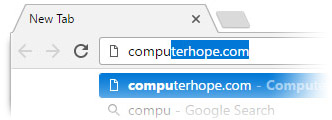
By default, web browsers give you suggestions when you begin typing in the address bar, automatically completing the text for you. They may suggest site URLs from your browsing history or bookmarks/favorites, popular search results, or sites you have open in other tabs.
The following sections show you how to clear your address bar history and then disable it if you choose. To proceed, select your browser from the list below and follow the instructions.
Chrome

To clear your address bar history, use Google's My Activity tool. After that, you can disable omnibox suggestions to prevent them from showing in the future.
How to clear the address bar history
- Open Google Chrome.
- Go to the My Google Activity page.
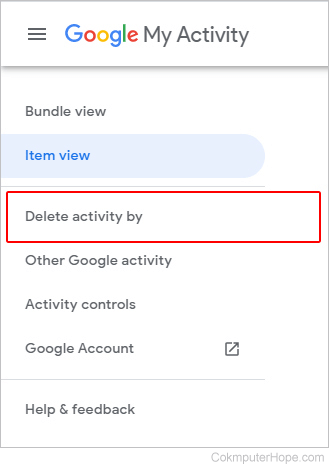
- On the left side of the screen, click the Delete activity by selector.
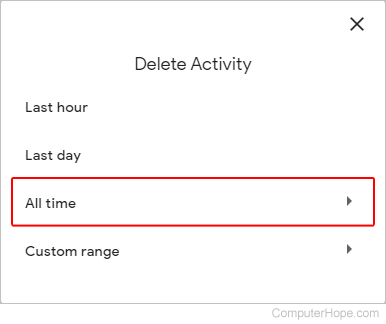
- In the Delete Activity prompt, click All time.
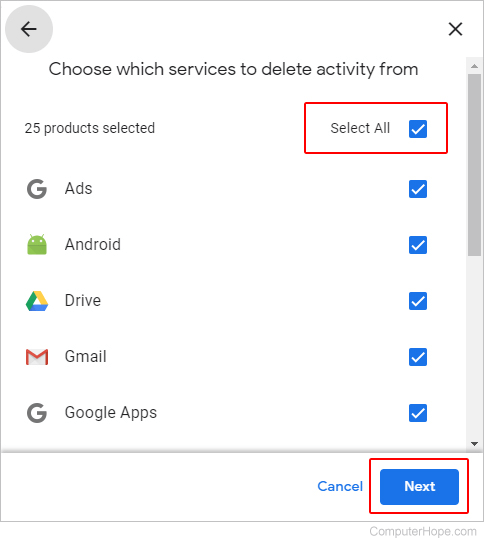
- In the upper-right corner of the next prompt, check the box next to Select All, and click the Next button.
- On the confirmation screen, in the lower-right corner, click the
 button.
How to disable omnibox suggestions
Once you've cleared your address bar history, you can turn off further tracking by disabling the Google omnibox suggestions.
- Open Google Chrome.
- Go to the My Google Activity page.
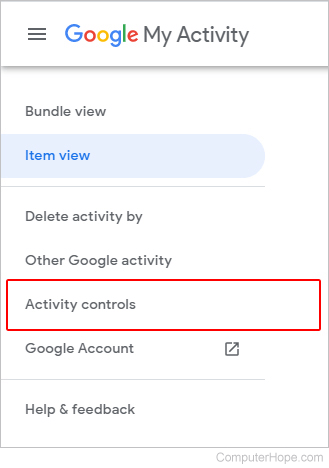
- On the left side of the screen, click the Activity controls selector.
- On the Activity controls page, click the Turn off button under the Web & App Activity section.
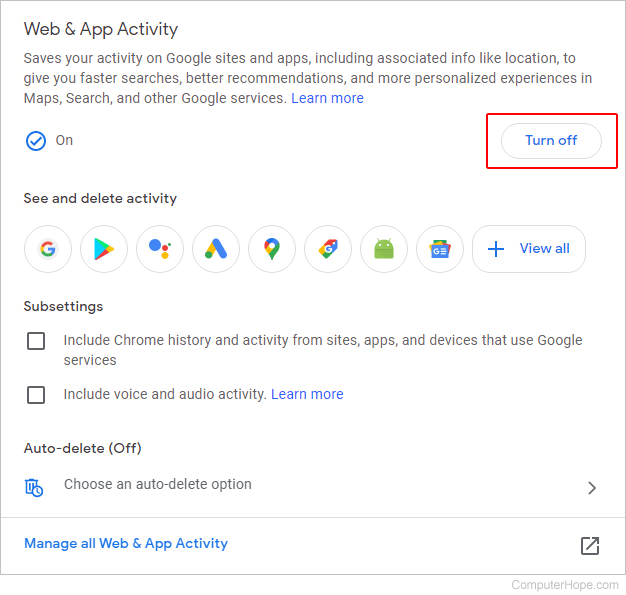
- When you click the Turn off button, you see the Pause Web & App Activity prompt. Click the
 button in the bottom-right corner.
Firefox

Firefox has a few options when to clear the address bar history. You can clear history from a specific site or all sites. The following sections show you how to do each and then disable the feature that tracks address bar history.
How to clear all address bar history
To clear all your address bar history in Firefox, clear your browser history. To learn how, see: How to clear Firefox history.
How to clear address bar history for one site
- Open the Mozilla Firefox browser.
- Click the Library icon
 in the upper-right corner of the browser window.
- Select History in the next menu.

- Scroll to the bottom of the new menu and click the Show All History button.

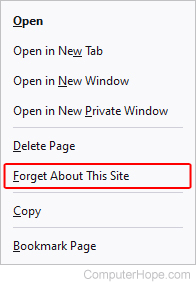
- Right-click one of the sites in your history, and select Forget About This Site.
How to disable address bar history
If you don't want to see any address bar suggestions in Firefox, you can disable them through the Privacy & Security options.
Microsoft Edge

In Microsoft Edge, there are a few steps to clear the address bar history. Edge always generates suggestions in the address bar based on your search history and favorites. So, to clear your address bar history and keep it that way, you must turn off address bar suggestions, force Edge to clear the history each time it closes, and remove favorites.
How to clear address bar history
One of the ways the address bar suggestions are populated is via your search history. To erase the search history, clear your browser's history. To learn how, see: How to clear Edge history.
How to clear browser history on exit
After you've cleared your history, toggle a setting that makes the browser clear history again each time you close the browser.
How to remove your favorites
Edge always keeps the address bar history for your favorites, even if you clear them. To remove those suggestions from the address bar, remove your favorites.
How to disable address bar history
If you don't want to see any address bar suggestions in Edge as you type, you can turn off the AutoComplete feature.
Microsoft Edge Legacy

To clear your address history in Microsoft Edge Legacy, clear your browsing history. Then, if you don't want to see future suggestions, disable the search and site suggestions feature.
How to clear address bar history
Address bar site suggestions are populated from your search history. To erase them, clear your browser history.
How to disable search and site suggestions
Toggling the AutoComplete feature to "off" keeps Edge Legacy from making suggestions as you type in search queries or web addresses.
Microsoft Internet Explorer

To clear your address history in Microsoft Internet Explorer, clear your browsing history. Then, if you don't want to see future suggestions, disable search and site suggestions.
How to clear address bar history
Address bar site suggestions are populated from your search history. To erase them, clear your browser history. To learn how, see: How to clear Internet Explorer history.
How to disable search and site suggestions
Toggling the AutoComplete feature to "off" keeps Internet Explorer from making suggestions as you type in search queries or web addresses.
Safari

To clear your address bar history in Safari, clear your browsing history. Then, if you don't want to see future suggestions, disable the suggestions feature. However, realize that Safari always makes address bar suggestions for sites you bookmarked.
How to clear address bar history
Address bar site suggestions are populated from your search history. To erase them, clear your browser history. To learn how, see: How to clear Safari history.
How to disable search and site suggestions
Disabling the "Include Safari Suggestions" option prevents Safari from making suggestions as you type search queries or web addresses.
Opera

To clear your address history in Opera, clear your browsing history. Then, if you don't want to see future suggestions, disable Opera's prediction service.
How to clear address bar history
Address bar site suggestions are populated from your search history. To erase them, clear your browser history. To learn how, see: How to clear Opera history.
How to disable search and site suggestions
Toggling the prediction service in Opera to "off" keeps it from making suggestions as you type search queries or web addresses.