
How to find what operating system is on a computer

Determining which operating system is running on a device helps you troubleshoot issues and know your computer or device's compatibilities. Below are the steps to tell which operating system and version are running on a computer, smartphone, or tablet.
Before identifying an operating system, you must know what type of computer you have. For help identifying a computer, see: How to find information about my computer. Alternatively, our system information tool can automatically detect your operating system.
IBM-compatible (PC) computer
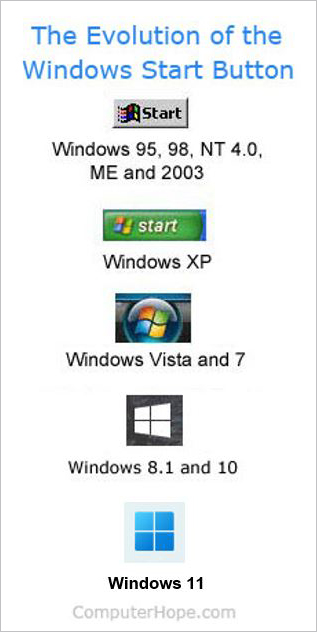
Nearly all IBM-compatible (PC) computers have Microsoft Windows installed on them. To determine if your computer is running Microsoft Windows 95 or later, look for the Start button in the bottom-left corner of your screen. If you see the Start button on your taskbar, your computer has Microsoft Windows.
If you don't see a Start button, you are running a different operating system. Below are some visual indications to determine what operating system you are using. If you do not have any graphics or a GUI (graphical user interface) and only see text, skip to the command line section.
GUI operating system visual indicators
- A Microsoft Windows logo or Microsoft Windows flag but no start button often indicates an earlier version of Microsoft Windows, such as Microsoft Windows 3.11.
- A red hat in the corner of the screen - The computer is running Red Hat Linux.
- A green or blue "L" in the corner of the screen - The computer is running Lindows or Linspire.
- A gray or black footprint in the corner of the screen means you have GNOME running on a Linux or Unix variant.
- A purple background with any visual indication of "Sun" or "Solaris" indicates the Sun Solaris operating system used with the X Window System.
Command line operating system
If you only have text, you're at the command line and can determine the operating system with any of the following commands.
On some systems, the command to view an operating and its version is disabled for security reasons. Also, not all operating systems have all the following commands.
Note to Linux and Unix users: Often, users running a Linux or Unix variant have a Linux variant with various graphical user interfaces. For example, you could be running Red Hat Linux using GNOME as the GUI. It is often better to use the console to determine what variant of Linux or Unix you are using. The uname command works with almost all variants of Linux and Unix.
If the uname command works and you need version information, type uname -a.
Additional information about the Linux version is found with the following commands, if the uname command is not available.
tail /etc/redhat-release
cat /etc/issue
Visual identification
If you are in front of the computer, reboot the computer often helps determine the computer's operating system. As the computer boots, it indicates the operating system as it starts.
If the screen is loading too fast, press Pause on the keyboard to pause the screen as it is loading.
Apple computer

All versions of Apple's operating system (macOS) have an Apple menu that opens by clicking a small Apple icon in the top-left corner of the screen. If you do not see this Apple logo on your screen, you're not running macOS. If you see this logo, the following steps help determine which version you're running (e.g., Ventura, Catalina, etc.).
- In the top-left corner of the desktop screen, click the Apple icon.
- In the Apple menu, select About this Mac or About this Computer.
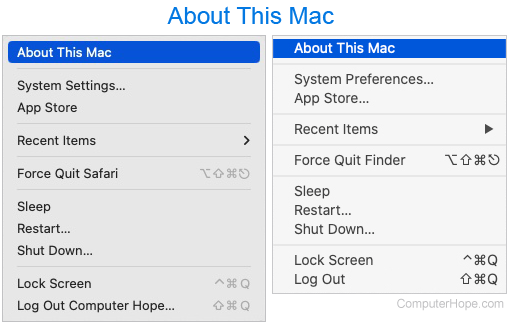
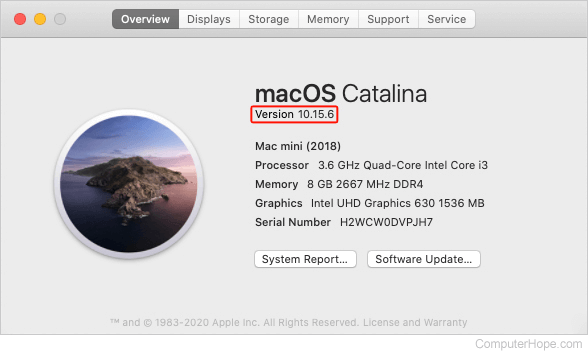
- A prompt should appear showing the current version of macOS installed on the computer.
An Apple computer can also run Microsoft Windows through Boot Camp.
Chromebook
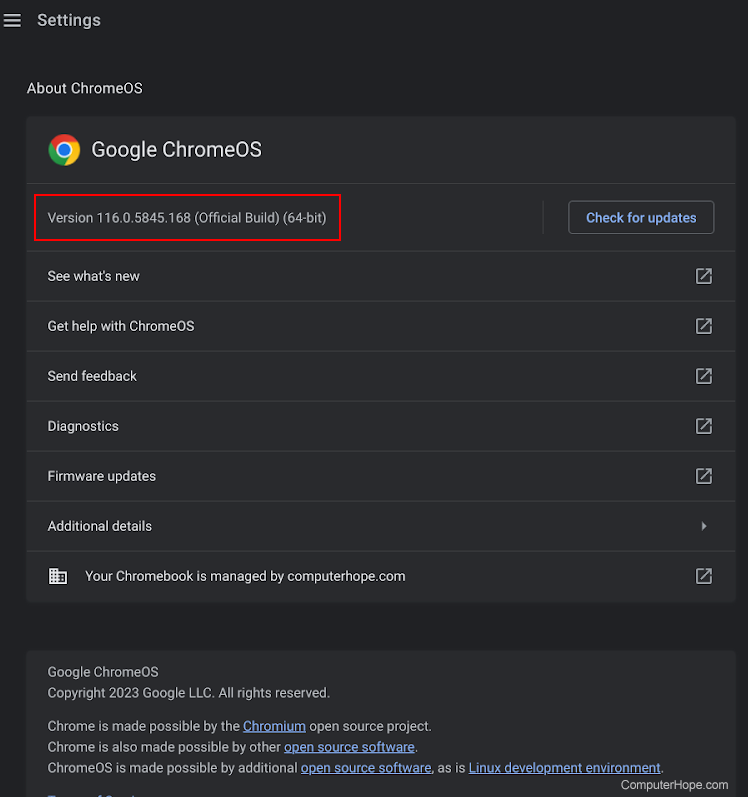
Chromebooks are identified by the keyboard Launcher key, which is in the same place as a Caps Lock key (below Tab) on Windows and macOS-based machines. If you're using a device with Chrome OS and want to know the version, follow these steps.
- In the lower-right corner, in the status bar, click the time.
- In the pop-up menu, select the Settings
 icon.
icon. - In the lower-left corner, click About Chrome OS.
- The version is displayed on the next screen.
Apple iPhone and iPad
Knowing the version of the Apple iOS operating system on your iPhone or iPad helps research and resolve issues specific to an iOS version. Follow the steps below to determine the iOS version on your Apple device.
- Access the Settings utility.
- Scroll down and tap the General option.
- Tap the About option.
- The iOS version on the device is listed in the iOS Version line.
Android smartphone and tablet device
Many different devices, including smartphones and tablets, use the Android operating system. Follow the steps below to determine the version of Android OS (operating system) on your Android device.
- Access the Settings utility.
- Find and tap the About phone or About device option.
- The version of Android OS is listed below the Android version entry.