
How to fix a "not a valid Win32 application" error
The file is corrupt, bad, or missing
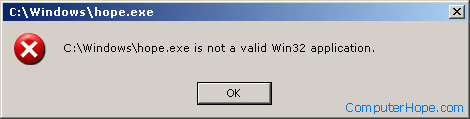
If the file or program you're attempting to run is corrupt or missing, Windows cannot execute the file properly and sometimes generate the error message above.
Download files
If you downloaded a file and verified it is complete and compatible, delete it and try downloading it again. It's possible during the download that the file became corrupted.
If the second download does not work, try downloading the file from a different web page. The person or company maintaining the website may have mistakenly uploaded a corrupt version of the file you are attempting to download.
Installing a program from a CD or other disk
If you're attempting to install a program and are getting this error, verify that the CD is clean. A dirty or bad CD (compact disc) can cause the error before or during installation because it was not copied properly to the computer.
Running a program from the computer
If you're running the program from a shortcut on the computer, verify that the program is still on the computer. Sometimes, if the program is no longer installed on the computer, you may get this error.
If a hard drive is corrupted or bad, it can also cause functional programs that are stored to fail. The reason this happens is because not all the data can be read from the hard drive, or its programs have become corrupted. Users may run ScanDisk and defrag on the hard drive to check for any potential errors.
A long file name issue
Make sure the program or file you're attempting to run does not contain the same name as the long file name directory containing the file. For example, executing a file named "program" in the "Program Files" directory can cause errors in some versions of Windows.
Additionally, if after installing a program it does not work, you may want to try installing it in a different directory.
Bad file
Any file can be changed or renamed to be a .exe file. If you're downloading the file, make sure the file is supposed to be a .exe file and that it's not being changed. If you're attempting to create a .exe file, make sure you're compiling the file for Windows and never rename a file to a .exe file. For example, renaming a .bat file to a .exe file will not make the file an executable file. For a file to become an executable, it needs to either be compiled or converted using a program.
File has invalid file association assigned
In Windows, each file extension (e.g., .exe, .jpg, .txt, etc.) is associated with a specific program that opens the file. Windows may be treating non-executable files as an executable file. Check the file association settings for the file you're trying to open and make sure the correct program is associated with the file. If necessary, you can modify the file association settings, to change what program is associated with the file.
A virus or malware infection on your computer may have also caused Windows to incorrectly think some file types are executable programs. Run a virus and malware scan on your computer to determine if this is a possible cause.
The file is not designed for your version of Windows
If you're trying to run a program that is not designed for your version of Windows, you may get this error. Although many older programs designed to work in older versions of Windows work with new versions of Windows, unfortunately, not all programs work.
- If the program is an older MS-DOS program or early Windows program, you may get this error.
- A program designed for a 64-bit version of Windows cannot run in a 32-bit version of Windows. Trying to run the program can generate this error.
The file is a virus, worm, or another malware file
This error can be generated by a file that is a virus, worm, trojan, or another malware file. Often, this is caused because the virus scanner installed in the computer does not allow the file to be installed or run. Try scanning the file to verify it is not a virus or infected with a virus.
If the file passes a virus scan, it may be that other software is conflicting with the program. Try booting the computer into Safe Mode and then running the program again. Booting the computer into Safe Mode makes sure nothing is running in the background that could be causing this issue.
Hardware incompatibility
If you're getting this error during the installation of a program, there might be an issue with the disc drive. The disc drive you're using to install the program (or its driver) may not be compatible with Windows.
Download the latest drivers for the CD-ROM (compact disc read-only memory) or DVD (digital versatile disc) drive through our drivers page.