
How to select or highlight multiple files and folders
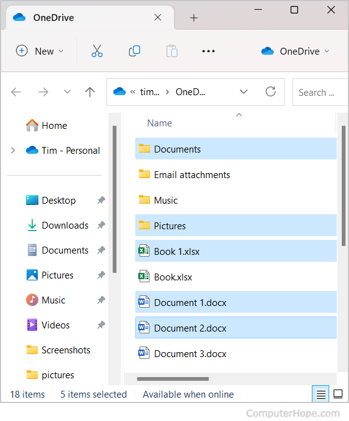
When working with Microsoft Windows, macOS, (or any operating system with a GUI (graphical user interface)), you may want to select multiple files to copy, delete, or move them all at once. The following sections describe different methods of selecting multiple files or folders.
Select all the files or folders in the current directory
"Select all" with keyboard shortcuts
In most operating systems and programs, the keyboard shortcut Ctrl+A (Command+A on macOS) selects all available text in the current text area, or all files in a file navigator window.
"Select all" using menus
In Windows 8 or Windows 10, the File/Edit/View menu is not available in File Explorer. Use Ctrl+A instead.
- Open a folder or directory in File Explorer or My Computer.
- Click Edit in the menu bar at the top of the window.
- Click Select All on the drop-down menu.
Once the files or folders are highlighted, right-click one of the highlighted files or folders to view available options to cut, copy, or delete. For additional help and information, see the below section on what can be done after the files or folders are highlighted.
Mouse drag and select multiple files or folders
If you have many files to select, the drag-and-select method is the easiest way to select a lot of files.
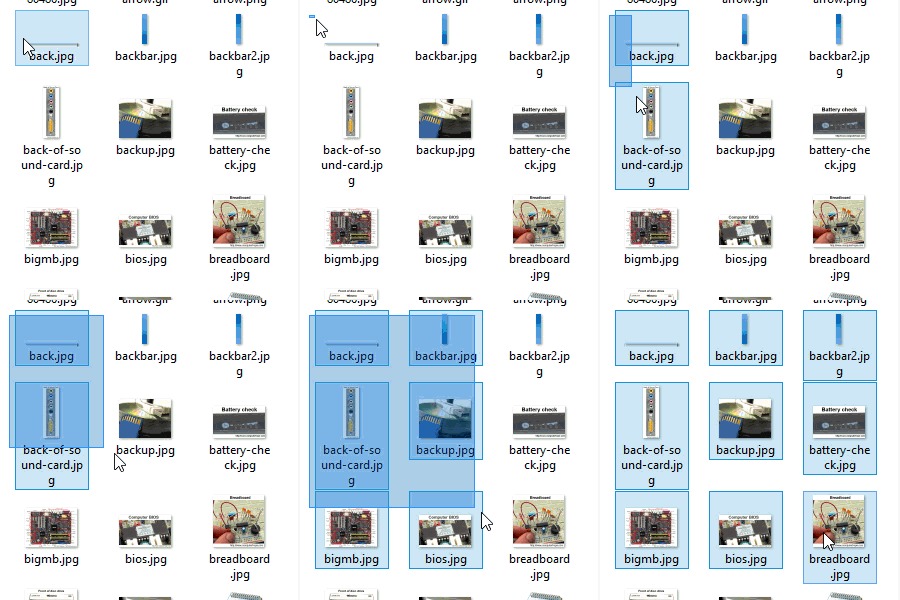
You can click-and-drag a box around the files or folders you want to select. Doing so selects all files and folders in that box, as shown in the animated picture.
To do this, click and hold your left mouse button on the top-left portion of where you want to start highlighting. Next, drag the box until the last file or folder is highlighted. Once the files are selected, they can be copied, cut, or dragged to another window to move them. They can also be dragged to the Trash/Recycle Bin to be deleted.
Once the files or folders are highlighted, right-click one of the highlighted files or folders to view available options, including cut, copy, or delete. For additional help and information, see the below section on what can be done after the files or folders are highlighted.
Select multiple grouped files or folders
- Click the first file or folder, and press and hold Shift.
- While holding Shift, click the last file or folder.
See the other tips section on how you can select grouped and non-grouped files or folders at the same time.
Once the files or folders are highlighted, right-click one of the highlighted files or folders to view available options to cut, copy, or delete. For additional help and information, see the below section on what can be done after the files or folders are highlighted.
Select multiple files or folders that are not grouped
- Click the first file or folder, and press and hold Ctrl.
- While holding Ctrl, click each of the other files or folders you want to select.
See the other tips section on how you can select grouped and non-grouped files at the same time.
Once the files or folders are highlighted, right-click one of the highlighted files or folders to view available options to cut, copy, or delete. For additional help and information, see the below section on what can be done after the files or folders are highlighted.
How to select without using the mouse
To select a file or folder using the keyboard, follow the steps below.
- Press Windows key+E to open File Explorer.
- Press Tab until you're in the section of the window containing the files or folders you want to select.
- Use the arrow keys to move to the file or folder you want to select.
- You can select more than one file or folder by pressing Shift and use the arrow keys highlight them.
Once the files or folders are highlighted, press the keyboard shortcut Ctrl+X to cut or Ctrl+C to copy, or press Delete to delete. For additional help and information, see the below section on what can be done after the files or folders are highlighted.
Other tips
You can use a combination of selecting multiple files or folders and single files or folders at the same time by following the steps below.
- Click the first file or folder you want to select.
- Hold down Shift, select the last file or folder, and then let go of Shift.
- Hold down Ctrl and click any other file(s) or folder(s) you want to add to those already selected.
Holding Ctrl and clicking a file or folder a second time deselects the file or folder.
What can be done once the files or folders are highlighted?
After the files or folders are highlighted, they can be copied, moved, deleted, or compressed into a single archive file.