
Why does the CD-ROM, DVD, or other disc drive tray not open?
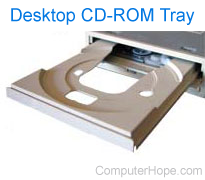
If the disc drive tray doesn't open on your computer, preventing you from inserting a disc, the following tips and information may help you fix the problem.
If your tray opens, but does not play a CD (compact disc) or DVD (digital versatile disc), see: How to fix a CD-ROM, DVD, or disc drive not working in Windows.
Locking device or software installed
First, verify no locking software is installed that prevents the tray from opening. If you are unsure, reboot the computer and as it is booting up, eject the tray. If the tray can eject as it's booting but stops working after loading your operating system, something loading is preventing the drive tray from opening. Programs used to burn CDs are a common culprit.
Bad eject button
If you are running Microsoft Windows, open My Computer, right-click the disc drive icon and choose the option to Eject. If this ejects your CD-ROM (compact disc read-only memory) drive tray, the button on the disc drive is defective, and we recommend the drive be replaced.
No power to the computer or disc drive
If you have recently installed a new optical drive or you have moved the computer, the power cable to the CD-ROM may have become loose or disconnected. Reseat the power cable to make sure this is not the problem.
CD stuck in the drive
If you suspect that a CD may be stuck in the drive, the tray needs to be ejected manually. Look for the small manual eject hole (not the headphone jack) on the front of the drive. Unwind a paper clip and place one end of the paper clip into the hole to eject the CD-ROM tray. You may need to apply some pressure to activate the manual tray ejection.
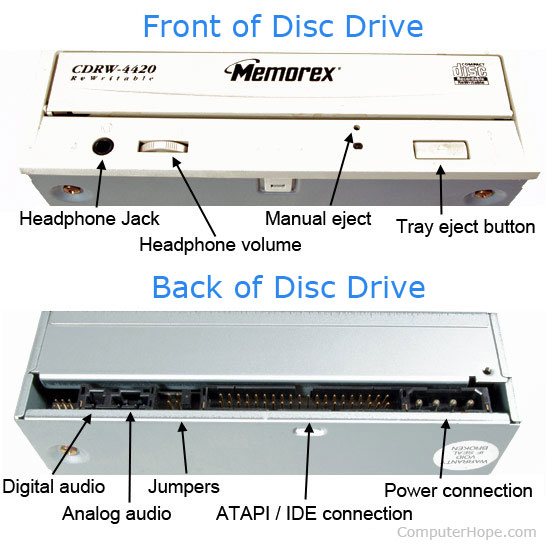
If CD-ROM tray opens part of the way, pull it gently to try opening it fully. If it cannot open any further, it's likely that the gears in the CD-ROM drive are damaged or dislodged. But usually, a stuck CD is blocking the way.
If the CD-ROM drive cannot be opened without using a paper clip, we do not recommend continuing to do so. Using a paper clip is only meant to be a temporary solution and we recommend you replace the drive.
Incompatible interface
If you have an IBM compatible computer, recently installed the CD-ROM drive and cannot open it, you may have a compatibility issue. Temporarily disconnect the IDE (integrated drive electronics) or SATA (Serial AT Attachment) cable to verify that you are not experiencing incompatibility between the CD-ROM drive and motherboard. Once the IDE or SATA cable is disconnected, power on the computer and see if the CD-ROM drive tray can be opened.
If the drive can be opened with the data cable disconnected, try a different cable. For older computers and CD-ROM drives, if the drive included an interface card, use the interface card to see if the issue is resolved. Also try connecting the CD-ROM drive to the ATAPI (AT Attachment Packet Interface) interface on the sound card or motherboard, if available.
Bad drive
If, after following the above recommendations you cannot open the CD-ROM drive using the front button, it's likely defective and should be replaced. It is not worth trying to repair a defective CD-ROM drive.