
Ping command

The ping command helps determine the TCP/IP network's IP address and issues with the network and assists in resolving them. See the ping definition for a full description.
Availability
Ping is an external command available for the following Microsoft operating systems as ping.exe.
- Windows 95
- Windows 98
- Windows Me
- Windows NT
- Windows 2000
- Windows XP
- Windows Vista
- Windows 7
- Windows 8
- Windows 10
- Windows 11
Ping syntax
Windows 10 and Windows 11 syntax
Usage: ping [-t] [-a] [-n count] [-l size] [-f] [-i TTL] [-v TOS] [-r count] [-s count] [[-j host-list] | [-k host-list]] [-w timeout] [-R] [-S srcaddr] [-c compartment] [-p] [-4] [-6] target_name
Options:
| -t | Pings the specified host until stopped. To see statistics and continue - type Control-Break; To stop - press Ctrl+C. |
| -a | Resolve addresses to hostnames. |
| -n count | Number of echo requests to send. |
| -l size | Send a buffer size. |
| -f | Set a don't fragment flag in the packet (IPv4-only). |
| -i TTL | TTL (Time To Live) time to live. |
| -v TOS | TOS (Type Of Service) type of service (IPv4-only. This setting is deprecated and has no effect on the type of service field in the IP header). |
| -r count | Record route for count hops (IPv4-only). |
| -s count | Timestamp for count hops (IPv4-only). |
| -j host-list | Loose source route along the host-list (IPv4-only). |
| -k host-list | Strict source route along the host-list (IPv4-only). |
| -w timeout | Timeout in milliseconds to wait for each reply. |
| -R | Use routing header to test reverse route also (IPv6-only). Per RFC 5095, using this routing header is deprecated. Some systems may drop echo requests if this header is used. |
| -S srcaddr | Source address to use. |
| -c compartment | Routing compartment identifier. |
| -p | Ping a Hyper-V Network Virtualization provider address. |
| -4 | Force using IPv4. |
| -6 | Force using IPv6. |
Windows Vista, 7, and 8 syntax
Usage: ping [-t] [-a] [-n count] [-l size] [-f] [-i TTL] [-v TOS] [-r count] [-s count] [[-j host-list] | [-k host-list]] [-w timeout] [-R] [-S srcaddr] [-4] [-6] target_name
Options:
| -t | Pings the specified host until stopped. To see statistics and continue - Type Control-Break; To stop - press Ctrl+C. |
| -a | Resolve addresses to hostnames. |
| -n | Count number of echo requests to send. |
| -l size | Send a buffer size. |
| -f | Set a don't fragment flag in the packet (IPv4-only). |
| -i | TTL time to live. |
| -v | TOS type of service (IPv4-only. This setting is deprecated and has no effect on the type of service field in the IP header). |
| -r count | Record route for count hops (IPv4-only). |
| -s count | Timestamp for count hops (IPv4-only). |
| -j host-list | Loose source route along the host-list (IPv4-only). |
| -k host-list | Strict source route along the host-list (IPv4-only). |
| -w timeout | Timeout in milliseconds to wait for each reply. |
| -R | Use routing header to test reverse route also (IPv6-only). Per RFC 5095, using this routing header is deprecated. Some systems may drop echo requests if this header is used. |
| -S srcaddr | Source address to use. |
| -4 | Force using IPv4. |
| -6 | Force using IPv6. |
Windows XP and lower syntax
ping [-t] [-a] [-n count] [-l size] [-f] [-i TTL] [-v TOS] [-r count] [-s count] [[-j host-list] | [-k host-list]] [-w timeout] destination-list
Options:
| -t | Pings the specified host until stopped. To see statistics and continue - Type Control-Break; To stop - press Ctrl+C. |
| -a | Resolves addresses to hostnames. |
| -n count | Number of echo requests to send. |
| -l size | Send a buffer size. |
| -f | Set don't fragment flag in the packet. |
| -i TTL | Time to live. |
| -v TOS | Type of service. |
| -r count | Record route for count hops. |
| -s count | Timestamp for count hops. |
| -j host-list | Loose source route along host-list. |
| -k host-list | Strict source route along host-list. |
| -w timeout | Timeout in milliseconds to wait for each reply. |
Ping examples
ping localhost
Pings the localhost, which helps determine if the computer can send information out and receive the information back from itself.
The command above does not send information over the network but can indicate if the card can respond.
ping computerhope.com
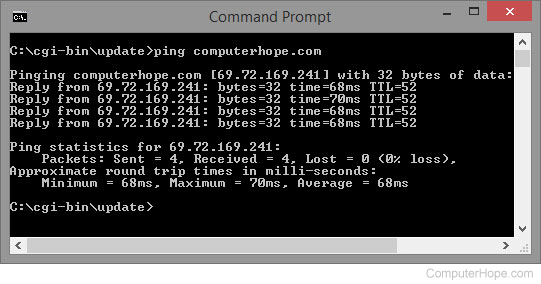
Ping supports the ability to ping an Internet address. In the example above, we pinged "computerhope.com" and, as seen, received four responses. If we couldn't reach the server or the server was blocking our request, we would have lost all four packets.
ping 216.58.216.164
Allows you to ping another computer where <216.58.216.164> can be the IP address of the computer you want to ping. If you do not get a reply or get lost packets, you have a problem with your network: cable issues, network card issues, drivers, router, switch, or other network problems.
Related questions
Is there a continuous ping option?
ping <address> -t
Use the -t option to ping any address until you cancel it by pressing Ctrl+C.
When I ping the IP address doesn't look right
With newer versions of the ping command and computers running on IPv6, you may get an IP address that looks like [fe80::51c1:5214:a18e:8dec%12] instead of [192.168.1.7]. To get the IPv4 IP address, use the following command.
ping <hostname> -4
The hostname can be any computer, and the -4 forces the address to be shown as an IPv4 address.