
How to fix Windows runtime errors
If you're getting a runtime error code and error message (e.g., "Runtime error 75 path/file access error"), skip to the runtime error listing for a listing of runtime error codes and errors.
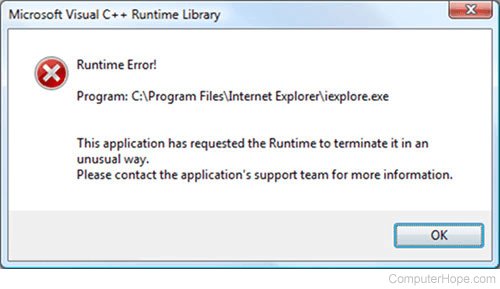
Microsoft Windows Runtime errors can be caused by a lot of different problems with the computer. Follow the steps below to help find and fix all Runtime errors.
Conflict with TSR or another running program
If you're encountering a runtime error message in Windows, verify a third-party program or TSR (terminate-and-stay-resident) by end tasking all open programs.
If, after end tasking all TSRs, you still have problems in Windows 95 or Windows 98, check autoexec.bat and config.sys for programs loading that are causing your issue. Then, temporarily disable these programs by renaming the files. Follow the instructions below for more information.
- Boot to MS-DOS.
- Once at the MS-DOS prompt, type:
cd\ <press Enter>
ren autoexec.bat autoexec.ch <press Enter>
ren config.sys config.ch <press Enter>
- Once completed, reboot the computer.
Software issue
If your issue persists, the program, utility, or game causing the runtime error may have issues. Verify through the developer's website that all available updates or patches are downloaded and applied.
If no patches or updates are available, uninstall and reinstall the program that is causing the issue. If you are having a runtime error in your operating system, reinstall the operating system.
Add-on, plug-in, or other extra software
Many runtime errors are also caused by other add-ons, plug-ins, or extra software installed on the computer. If you have any additional software associated with the program causing the error, update or uninstall it, and see if that resolves the issue.
Computer virus
Because computer viruses and malware can tamper with the system settings or memory, it can cause a runtime error. If you are currently running a virus protection program on your computer, ensure it is fully updated with the latest virus definitions.
If you do not have a computer virus protection program, we recommend one be purchased or that a demo be temporarily downloaded to scan your computer hard drive for viruses.
Memory issue
Finally, if you have followed all the above recommendations and are still getting runtime errors, you may be encountering a hardware or memory related issue. We recommend you first contact the developer of the program causing the issue for any possible solutions. If no solutions are found, we recommend you contact the computer or motherboard manufacturer for additional recommendations or service.
Runtime error listings
Below is a listing of Microsoft Windows and Windows software runtime error codes and related Runtime error messages. Each error has additional information on what's causing the Runtime error and how to fix the problem.
| Code | Runtime error | Additional information |
|---|---|---|
| 5 | Illegal function call | Program error, verify the program has all the latest updates. If updated, try reinstalling the program. If you continue to have the same errors, contact the software developer. |
| 6 | Overflow | Program error, verify the program has all the latest updates. If updated, try reinstalling the program. If you continue to have the same errors, contact the software developer. |
| 7 | Out of memory | Caused when the computer does not meet the program's system requirements or there is not enough memory available for the program to run. If your computer meets the requirements, first try reinstalling the program to make sure it's not an issue with the program installation. If this doesn't resolve your issue, see: How to fix low memory and out of memory errors. |
| 9 | Subscript out of range | Program error, verify the program has all the latest updates. If updated, try reinstalling the program. If you continue to have the same errors, contact the software developer. |
| 10 | Duplicate definition | Program error, verify the program has all the latest updates. If updated, try reinstalling the program. If you continue to have the same errors, contact the software developer. |
| 11 | Division by zero | Problem with a math formula in the program or the program's code. Verify no software updates are available for the program causing this error. |
| 13 | Type Mismatch | Make sure your system regional settings are set up correctly and that the program you're running is made for your version of Windows. |
| 14 | Out of string space | Program error, verify the program has all the latest updates. If updated, try reinstalling the program. If you continue to have the same errors, contact the software developer. |
| 19 | No Resume | Program error, verify the program has all the latest updates. If updated, try reinstalling the program. If you continue to have the same errors, contact the software developer. |
| 20 | Resume without error | Program error, verify the program has all the latest updates. If updated, try reinstalling the program. If you continue to have the same errors, contact the software developer. |
| 28 | Out of stack space | Caused by a program or memory error. Follow our out of memory troubleshooting steps, see: How to fix low memory and out of memory errors. |
| 35 | Sub or Function not defined | Program error, verify the program has all the latest updates. If updated, try reinstalling the program. If you continue to have the same errors, contact the software developer. |
| 48 | Error in loading DLL | Caused with a bad installation or an issue caused after another program is installed that replaced the program's DLL (dynamic-link library). Close all programs and TSRs and try installing the program again. |
| 52 | Bad file name or number | Program error, verify the program has all the latest updates. If updated, try reinstalling the program. If you continue to have the same errors, contact the software developer. |
| 53 | File not found | File required by the program to run is not found. Program needs to be reinstalled or missing file(s) need to be copied back to the computer. |
| 54 | Bad file mode | Program error, verify the program has all the latest updates. If updated, try reinstalling the program. If you continue to have the same errors, contact the software developer. |
| 55 | File already open | Program or file associated with program are in use and program cannot get access. Try closing all open and background programs and run program again, see: How to remove TSRs and startup programs. |
| 58 | File already exists | Program error, verify the program has all the latest updates. If updated, try reinstalling the program. If you continue to have the same errors, contact the software developer. |
| 61 | Disk full | The disk, for example, the hard drive doesn't have enough space for the program to run or store copied files. For help with freeing up disk space, see: How to find how much hard drive space is available. |
| 62 | Input past end of file | Program error, verify the program has all the latest updates. If updated, try reinstalling the program. If you continue to have the same errors, contact the software developer. |
| 63 | Bad record number | Program error, verify the program has all the latest updates. If updated, try reinstalling the program. If you continue to have the same errors, contact the software developer. |
| 64 | Bad file name | Program error, verify the program has all the latest updates. If updated, try reinstalling the program. If you continue to have the same errors, contact the software developer. |
| 68 | Device unavailable | A hardware device or necessary requirement for the program is not found. Verify all hardware and software required by the program is installed. If you continue to have the same issues, verify the latest updates are installed for the program and any hardware device the program needs. |
| 70 | Permission denied | The location of where the program is being copied is restricted or a file being overwritten is in use. Try closing all programs and TSRs, see: How to remove TSRs and startup programs. |
| 71 | Disk not ready | Verify you have proper rights. |
| 74 | Can't rename with different drive | Program error, verify the program has all the latest updates. If updated, try reinstalling the program. If you continue to have the same errors, contact the software developer. |
| 75 | Path/File access error | Program does not have rights or access to a file. Often this is caused when a program is trying to access a network file. It doesn't have proper access to either because of network privileges or something is blocking the program. For example, if the file is in use by another program or is read-only. |
| 76 | Path not found | The programs directory containing files needing to be copied is missing or path is incorrect. Try reinstalling the program. |
| 91 | Object variable set to Nothing | Program error, verify the program has all the latest updates. If updated, try reinstalling the program. If you continue to have the same errors, contact the software developer. |
| 93 | Invalid pattern | Program error, verify the program has all the latest updates. If updated, try reinstalling the program. If you continue to have the same errors, contact the software developer. |
| 94 | Illegal use of NULL | Program error, verify the program has all the latest updates. If updated, try reinstalling the program. If you continue to have the same errors, contact the software developer. |
| 102 | Command failed | Program error, verify the program has all the latest updates. If updated, try reinstalling the program. If you continue to have the same errors, contact the software developer. |
| 339 | A file is missing or invalid | An associated program file is missing or corrupt. Try reinstalling the program. |
| 429 | Object creation failed | Program is corrupted, try reinstalling the program generating the runtime error. |
| 438 | No such property or method | Program error, verify the program has all the latest updates. If updated, try reinstalling the program. If you continue to have the same errors, contact the software developer. |
| 439 | Argument type mismatch | Program error, verify the program has all the latest updates. If updated, try reinstalling the program. If you continue to have the same errors, contact the software developer. |
| 440 | Object error | Program error, verify the program has all the latest updates. If updated, try reinstalling the program. If you continue to have the same errors, contact the software developer. |
| 901 | Input buffer would be larger than 64 K in size. | Program error, verify the program has all the latest updates. If updated, try reinstalling the program. If you continue to have the same errors, contact the software developer. |
| 902 | Operating system error | Verify the program is compatible with your version of Windows and has any software updates. |
| 903 | External procedure not found | Program error, verify the program has all the latest updates. If updated, try reinstalling the program. If you continue to have the same errors, contact the software developer. |
| 904 | Global variable type mismatch. | Program error, verify the program has all the latest updates. If updated, try reinstalling the program. If you continue to have the same errors, contact the software developer. |
| 905 | User-defined type mismatch. | A setting either in the program shortcut or being defined by the user is correct. Try running the program without any additional settings or variables. |
| 906 | External procedure interface mismatch. | Program error, verify the program has all the latest updates. If updated, try reinstalling the program. If you continue to have the same errors, contact the software developer. |
| 1001 | Out of memory | Computer does not meet the program's system requirements or there is not enough memory for the program to run. If your computer meets the requirements, try first reinstalling the program to make sure it's not an issue with the program installation. If this does not resolve your issue, see: How to fix low memory and out of memory errors. |
| 1025 | DLL is not supported | Bad installation or an issue caused after another program that is installed and replaced the program's DLL. Close all programs and TSRs and try installing the program again. |
| 6025 | How to fix Microsoft Windows r6025 runtime error. |